exe file — Execution script for running ReaxFF
The exe file is a user-provided execution script responsible for:
- Preparing the run directory
- Copying input files to the correct locations
- Calling the ReaxFF executable
- Optionally collecting or post-processing output files
The script is typically written as a UNIX shell script and executed from the command line.
Purpose of the exe script
ReaxFF itself does not manage file locations or job setup. Instead, the exe script acts as a lightweight workflow driver that:
- Copies user input files into the working directory
- Maps human-readable filenames to ReaxFF’s internal
fort.#units - Launches the ReaxFF binary
- (Optionally) copies output files to organized locations
Users with experience in UNIX shell scripting often customize this script to match their local environment, job scheduler, or file layout.
File name mapping and ReaxFF conventions
Although this manual refers to input files using descriptive names such as geo and ffield, ReaxFF internally expects these files under specific Fortran unit numbers:
| Logical name | ReaxFF unit | Notes |
|---|---|---|
geo |
fort.3 |
Geometry input |
ffield |
fort.4 |
Force field definition |
control |
hard-coded | Read directly by name |
models.in |
hard-coded | Model list |
trainset.in |
hard-coded | Training set |
tregime.in |
hard-coded | Temperature regime |
Only
geoandffieldneed to be explicitly mapped tofort.#files by theexescript.
Other inputs are opened by ReaxFF using fixed filenames and must not be renamed.
Example 2.10: UNIX exe script for running ReaxFF
Figure 1 shows an example exe script used by the original author to run ReaxFF from the UNIX command line.
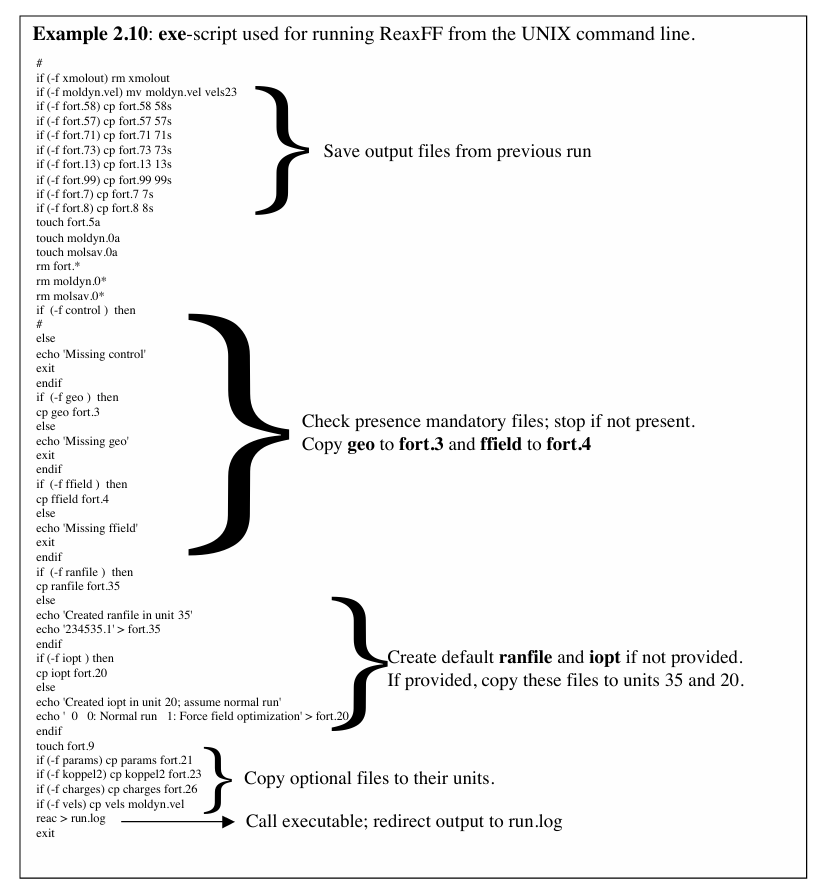
#!/bin/sh

# Example ReaxFF execution script

# Clean previous run
rm -f fort.*

# Copy input files
cp geo      fort.3
cp ffield   fort.4

# Run ReaxFF
./reaxff.x

# Optional: collect outputs
mkdir -p output
cp fort.* output/
This example is intentionally minimal. Production workflows often add: - Error handling - Timestamped run directories - MPI execution (
mpirun,srun) - Scheduler integration (SLURM, PBS) - Automatic post-processing
Customization guidelines
When adapting the exe script:
- Ensure
geo → fort.3andffield → fort.4mappings are correct - Do not rename files that ReaxFF opens by hard-coded names
- Confirm the correct ReaxFF executable (
reaxff.x) is called - Use absolute paths if running from batch systems or job schedulers
Relation to modern workflows
While the traditional exe script is effective for manual runs, modern tools (including ReaxKit) often replace it with:
- Python-based launchers
- Structured directory management
- Automated post-processing pipelines
Nevertheless, understanding the exe script is essential for interpreting legacy ReaxFF workflows and reproducing published results.