Active Site Workflow
Direct command workflow for active-site analyses.
This module implements CLI workflow orchestration for its command family, including argument parsing, request construction, execution dispatch, and result presentation handoff.
Usage context
- Command routing: Resolve CLI aliases and normalized command names.
- Task execution: Build request objects and invoke registered tasks.
- Output handling: Forward results to table, plot, export, or report flows.
Command: get_active_site_structural
Compute per-atom active-site structural descriptors on a selected frame. Use this command when you need atom-resolved structural labels and geometry metrics around active sites from connectivity trajectory data. This command analyzes prepared analysis inputs and does not run a simulation.
Examples
  1. Baseline structural analysis on frame 0:
   reaxkit get_active_site_structural --frame 0 --bo-threshold 0.3

  2. Strict carbon-focused analysis on a later frame:
   reaxkit get_active_site_structural --frame 100 --no-include-noncarbon --strict-tract

  3. Render and save a structural plot:
   reaxkit get_active_site_structural --plot single --save active_site_structural.png
Arguments
Scientific choices
| Flag | Required | Default | Help | Choices |
|---|---|---|---|---|
--frame |
No | 0 | Frame index used for structural analysis. Example: --frame 100, which runs the descriptor extraction on frame 100. | |
--bo-threshold |
No | 0.3 | Bond-order threshold used to build connectivity. Example: --bo-threshold 0.4, which requires stronger bonds to count as connected. | |
--bond-mode |
No | bo | Bond graph source: bo (from ConnectivityData.bond_orders) or distance (TRACT geometric cutoffs) | bo, distance |
--bond-scale |
No | 1.2 | Scale factor on covalent radii for distance mode | |
--alpha-radius |
No | 0.0 | Alpha-shape radius for non-periodic boundary detection | |
--gap-deg |
No | 220.0 | Angular-gap threshold for boundary fallback | |
--carbon-element |
No | C | Element symbol used for carbon network analysis | |
--include-noncarbon, --no-include-noncarbon |
No | True | Include non-carbon atoms in output table | |
--strict-tract, --no-strict-tract |
No | False | Raise if canonical structural output cannot satisfy strict TRACT compatibility | |
--soap, --no-soap |
No | False | Compute optional SOAP descriptors (soap_pc1/2/3 and optional soap_score). | |
--soap-ref-path |
No | Optional .npy reference SOAP vectors for soap_score. | ||
--soap-r-cut |
No | 5.0 | SOAP cutoff radius in angstrom. | |
--soap-n-max |
No | 9 | SOAP radial basis size. | |
--soap-l-max |
No | 9 | SOAP angular basis size. | |
--soap-zeta |
No | 2 | SOAP kernel exponent for reference similarity. |
Input and file selection
| Flag | Required | Default | Help | Choices |
|---|---|---|---|---|
--engine |
No | reaxff, ams, lammps | ||
--input |
No | . | Input file or directory for engine resolution | |
--run-dir, --dir |
No | . | Run directory fallback for engine detection | |
--fort7 |
No | fort.7 | Path to fort.7 | |
--xmolout |
No | xmolout | Path to xmolout | |
--summary |
No | Optional summary.txt path |
Outputs and plots
| Flag | Required | Default | Help | Choices |
|---|---|---|---|---|
--plot |
No | Render a plot | single, subplot | |
--show |
No | False | Show the generated plot window | |
--save |
No | Save the generated plot to a file path | ||
--export |
No | Write the result table to CSV | ||
--grid |
No | Subplot grid like 2x2 or 2*2 | ||
--report, --no-report |
No | False | Generate a report under reports/ |
|
--report-format |
No | both | Report format when --report is enabled. | both, pdf, docx |
--detail-format |
No | Optional detail format (default: Parquet; legacy: CSV). | parquet, csv |
Execution
| Flag | Required | Default | Help | Choices |
|---|---|---|---|---|
--execution |
No | auto | Execution backend; unsupported backends fall back to serial with a logged reason. | auto, serial, threads, processes |
--workers |
No | 0 | Frame workers: auto or N (default: auto). | |
--chunk-size |
No | 0 | Maximum in-flight frames: auto or N. |
Storage and cache
| Flag | Required | Default | Help | Choices |
|---|---|---|---|---|
--run-id |
No | Run identifier for run-scoped layout. Example: --run-id run_91ac0e, which reuses that run identifier. | ||
--project-root |
No | reaxkit_workspace | Project root that contains inputs/, data/, analysis/, etc. Example: --project-root ./workspace, which stores run artifacts there. | |
--analysis-id |
No | Optional analysis artifact id; defaults to run id. Example: --analysis-id comparison-a, which names the analysis artifact explicitly. | ||
--input-cache, --no-input-cache |
No | True | Reuse parsed input frames across commands (default: enabled; use --no-input-cache to force source reads for reproducibility checks or benchmarks). Example: --no-input-cache, which reloads frames from their source files. | |
--frame-cache-max-gb |
No | 10.0 | Maximum workspace frame-cache size in GiB (default: 10; use 0 for unlimited). Example: --frame-cache-max-gb 20, which caps cached frames at 20 GiB. | |
--output-profile |
No | standard | Select the shared artifact policy. Standard writes declared default outputs; minimal keeps core tables; full and legacy include optional details. Default: standard. Example: --output-profile full, which includes declared optional detail tables. | minimal, standard, full, legacy |
Diagnostics and compatibility
| Flag | Required | Default | Help | Choices |
|---|---|---|---|---|
-h, --help |
No | show this help message and exit | ||
--help-all, --all-flags |
No | Show every option, grouped by purpose. | ||
--log |
No | Logging level | verbose, quiet |
- A spatial x-y active-site map where atoms are colored by absolute pyramidalization |d_pyr|, with under-coordinated atoms highlighted as red stars.
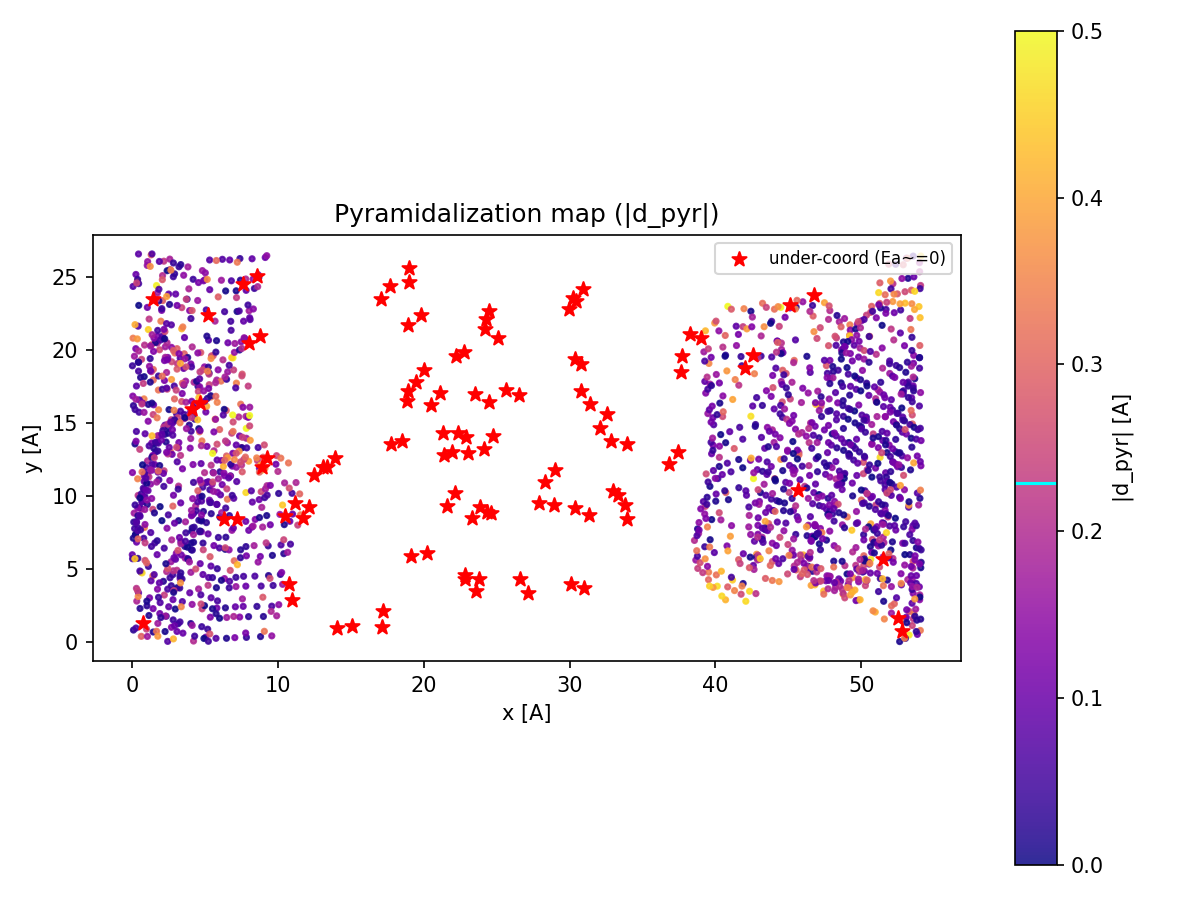
Figure: Spatial map of pyramidalization with under-coordinated atoms highlighted.
- A spatial x-y map from active_site_structural showing each atom colored by its assigned active-site label, such as basal, defect, edge_armchair, or edge_zigzag.
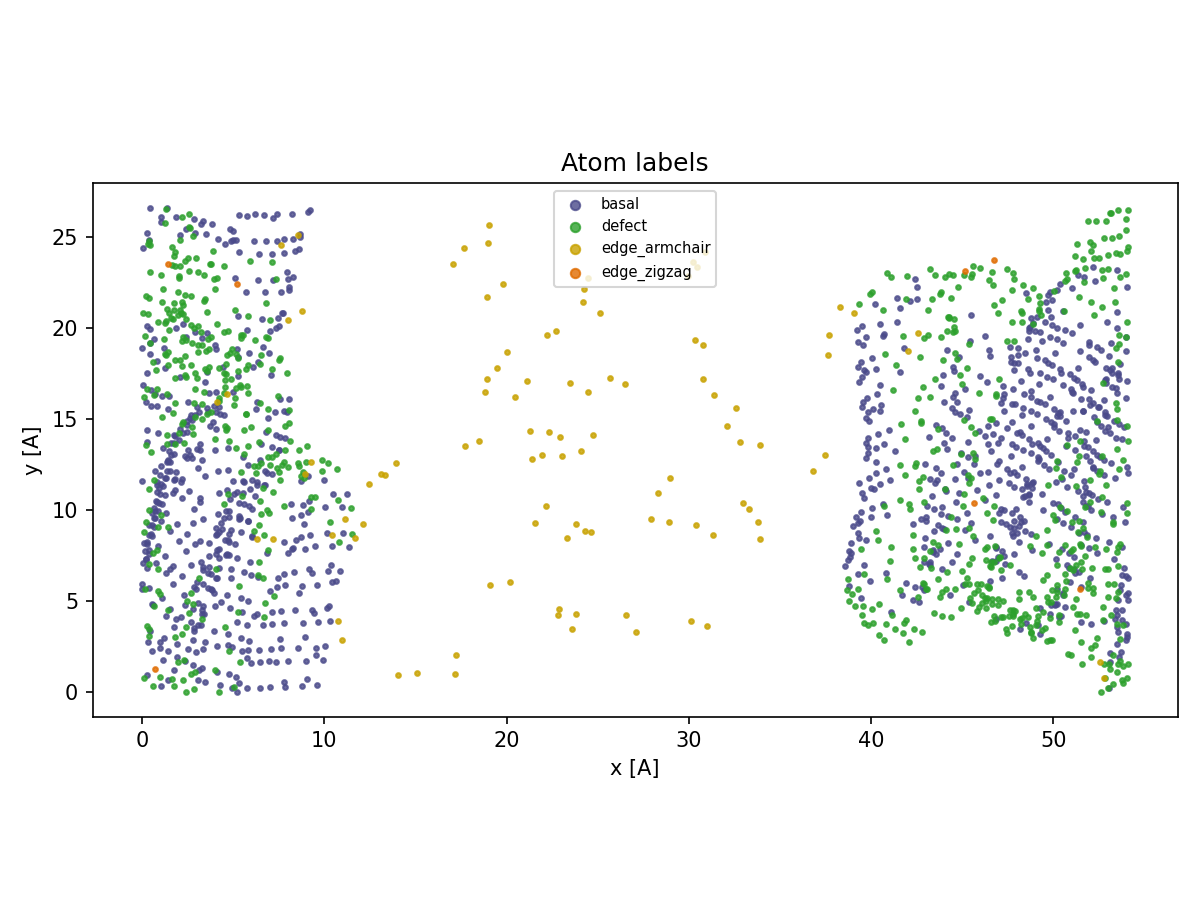
Figure: Spatial map of active-site labels.
- A spatial x-y map from active_site_structural showing atoms colored by detected grain_id regions from psi6 orientation-based region growing.
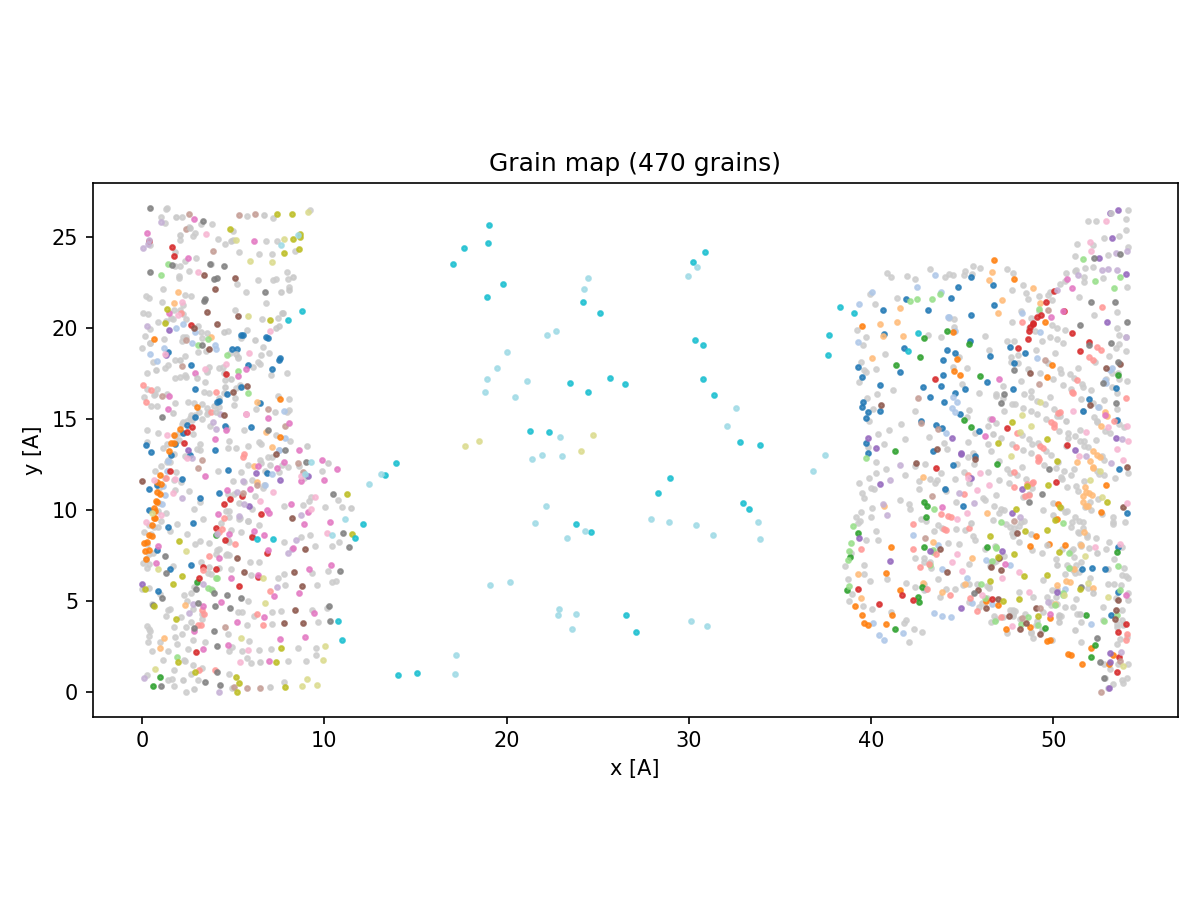
Figure: Spatial map of grain IDs from psi6 region-growing.
- A histogram from active_site_structural comparing the |d_pyr| pyramidalization distribution by site label, with the tau_opt = 0.229 Å threshold marked.
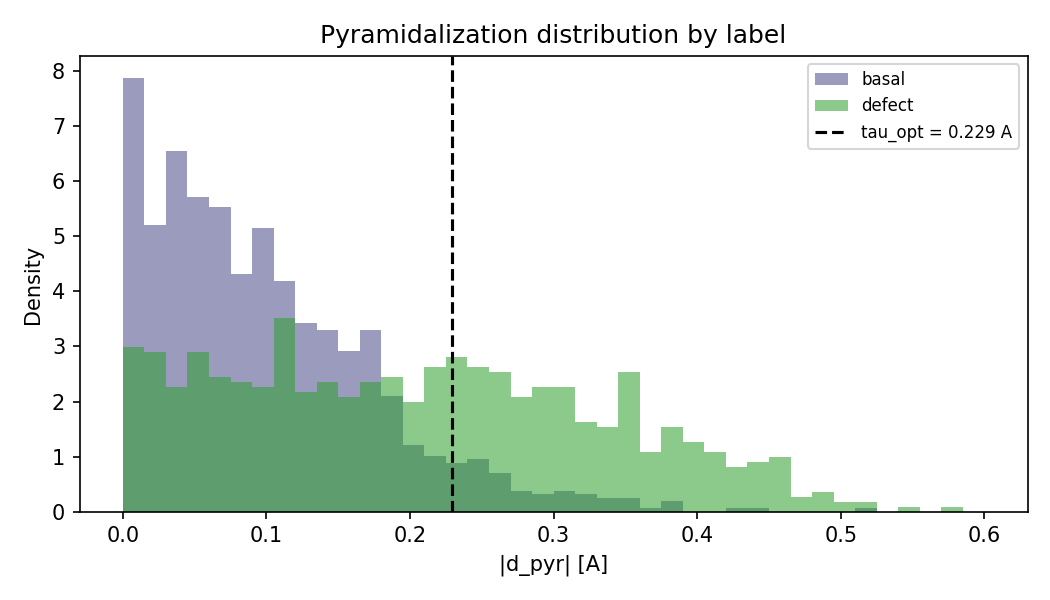
Figure: Distribution of pyramidalization by site label.
Command: get_active_site_events
Extract persistent active-site C-O and C-Si events across trajectory frames. Use this command to detect bond-forming or bond-breaking event patterns over time from connectivity-aware data. Use --diagnose first to sample C-X distance distributions and choose distance cutoffs. This command analyzes existing data and does not generate force-field input templates.
Examples
  0. Diagnose distance cutoffs before full extraction:
   reaxkit get_active_site_events --diagnose --r-probe 2.5 --max-diag-frames 500

  1. Automatic mode for persistent events:
   reaxkit get_active_site_events --mode auto --persist 5

  2. Bond-order mode on a sampled frame range:
   reaxkit get_active_site_events --frames 0:500:5 --mode bo --bo-threshold 0.8

  3. Distance mode with custom cutoffs:
     reaxkit get_active_site_events --input 30_1073_ams.rkf --r-co 1.65 --persist 50 --every 10     reaxkit get_active_site_events --mode dist --r-co 1.65 --r-csi 2.10 --strict-tract
Arguments
Scientific choices
| Flag | Required | Default | Help | Choices |
|---|---|---|---|---|
--frames |
No | Frames: "0,10,20", "0 10 20", "0:20", "0-20", or "0:20:2" | ||
--every, --stride |
No | 10 | Use every Nth selected frame (TRACT alias: --stride; default: 10) | |
--mode |
No | auto | Event detection mode | auto, bo, dist |
--bo-threshold, --bo_threshold |
No | 0.8 | Bond-order threshold for bo mode | |
--r-co, --r_CO |
No | 1.65 | C-O distance cutoff in angstrom for dist mode | |
--r-csi, --r_CSi |
No | 2.1 | C-Si distance cutoff in angstrom for dist mode | |
--r-probe |
No | 2.5 | Generous C-X cutoff in angstrom used for diagnostic close-approach episodes | |
--timestep-fs |
No | 10.0 | Raw trajectory timestep in fs used to report diagnostic episode durations | |
--carbon-element |
No | C | Carbon element symbol | |
--oxygen-element |
No | O | Oxygen element symbol | |
--silicon-element |
No | Si | Silicon element symbol | |
--strict-tract, --no-strict-tract |
No | False | Raise if canonical events output cannot satisfy strict TRACT compatibility |
Input and file selection
| Flag | Required | Default | Help | Choices |
|---|---|---|---|---|
--engine |
No | reaxff, ams, lammps | ||
--input |
No | . | Input file or directory for engine resolution | |
--run-dir, --dir |
No | . | Run directory fallback for engine detection | |
--fort7 |
No | fort.7 | Path to fort.7 | |
--xmolout |
No | xmolout | Path to xmolout | |
--summary |
No | Optional summary.txt path |
Outputs and plots
| Flag | Required | Default | Help | Choices |
|---|---|---|---|---|
--plot |
No | Render a plot | single, subplot | |
--show |
No | False | Show the generated plot window | |
--save |
No | Save the generated plot to a file path | ||
--export |
No | Write the result table to CSV | ||
--grid |
No | Subplot grid like 2x2 or 2*2 | ||
--report, --no-report |
No | False | Generate a report under reports/ |
|
--report-format |
No | both | Report format when --report is enabled. | both, pdf, docx |
--persist |
No | 50 | Required consecutive analyzed frames for confirmed binding | |
--detail-format |
No | Optional detail format (default: Parquet; legacy: CSV). | parquet, csv |
Execution
| Flag | Required | Default | Help | Choices |
|---|---|---|---|---|
--execution |
No | auto | Execution backend; unsupported backends fall back to serial with a logged reason. | auto, serial, threads, processes |
--workers |
No | 0 | Frame workers: auto or N (default: auto). | |
--chunk-size |
No | 0 | Maximum in-flight frames: auto or N. |
Storage and cache
| Flag | Required | Default | Help | Choices |
|---|---|---|---|---|
--run-id |
No | Run identifier for run-scoped layout. Example: --run-id run_91ac0e, which reuses that run identifier. | ||
--project-root |
No | reaxkit_workspace | Project root that contains inputs/, data/, analysis/, etc. Example: --project-root ./workspace, which stores run artifacts there. | |
--analysis-id |
No | Optional analysis artifact id; defaults to run id. Example: --analysis-id comparison-a, which names the analysis artifact explicitly. | ||
--input-cache, --no-input-cache |
No | True | Reuse parsed input frames across commands (default: enabled; use --no-input-cache to force source reads for reproducibility checks or benchmarks). Example: --no-input-cache, which reloads frames from their source files. | |
--frame-cache-max-gb |
No | 10.0 | Maximum workspace frame-cache size in GiB (default: 10; use 0 for unlimited). Example: --frame-cache-max-gb 20, which caps cached frames at 20 GiB. | |
--output-profile |
No | standard | Select the shared artifact policy. Standard writes declared default outputs; minimal keeps core tables; full and legacy include optional details. Default: standard. Example: --output-profile full, which includes declared optional detail tables. | minimal, standard, full, legacy |
Diagnostics and compatibility
| Flag | Required | Default | Help | Choices |
|---|---|---|---|---|
-h, --help |
No | show this help message and exit | ||
--help-all, --all-flags |
No | Show every option, grouped by purpose. | ||
--log |
No | Logging level | verbose, quiet | |
--diagnose |
No | False | Sample C-X distance and episode distributions to choose --r-co/--r-csi and --persist before full extraction | |
--max-diag-frames |
No | 500 | Maximum sampled frames for --diagnose |
Common Runtime and Presentation Arguments
These are shared workflow-level CLI flags added before command-specific options, covering runtime context (engine/input/storage) and output presentation/export behavior.
Each command table above includes its shared and inherited options.