Connectivity Workflow
Direct command workflow for connectivity analyses.
This module implements CLI workflow orchestration for its command family, including argument parsing, request construction, execution dispatch, and result presentation handoff.
Usage context
- Command routing: Resolve CLI aliases and normalized command names.
- Task execution: Build request objects and invoke registered tasks.
- Output handling: Forward results to table, plot, export, or report flows.
Command: connection_list
List atom-to-atom connections extracted from bond-order frames.
Use this command to inspect which atom pairs are connected at selected frames,
with optional bond-order thresholding and direction collapsing.
Examples
  1. Export connections for selected frames:
   reaxkit get_connection_list --fort7 fort.7 --frames 0 1 2 --export connections.csv

  2. Keep only edges above a BO threshold and collapse i-j/j-i duplicates:
   reaxkit get_connection_list --fort7 fort.7 --min-bo 0.3 --undirected

  3. Include self-connections in output:
   reaxkit get_connection_list --fort7 fort.7 --include-self
Arguments
Scientific choices
| Flag |
Required |
Default |
Help |
Choices |
--frames |
No |
|
Frames selection syntax. Example: --frames 0:20:2, which selects frames 0,2,4,...,20. |
|
--every |
No |
1 |
Use every Nth selected frame. Example: --every 5, which subsamples selected frames by a factor of 5. |
|
--min-bo |
No |
0.0 |
Minimum bond order. Example: --min-bo 0.3, which filters out weaker bonds below 0.3. |
|
--undirected, --no-undirected |
No |
True |
Collapse i-j and j-i. Example: --no-undirected, which keeps directed pair ordering. |
|
--include-self |
No |
False |
Include self connections. Example: --include-self, which keeps i->i entries when present. |
|
| Flag |
Required |
Default |
Help |
Choices |
--engine |
No |
|
Engine override. Example: --engine reaxff, which forces ReaxFF file parsing rules. |
reaxff, ams, lammps |
--input |
No |
. |
Input file or directory for engine resolution. Example: --input runs/job1, which points loader context to that run. |
|
--run-dir, --dir |
No |
. |
Run directory fallback for engine detection. Example: --run-dir runs/job1, which acts as backup search location. |
|
--fort7 |
No |
fort.7 |
Path to fort.7. Example: --fort7 runs/job1/fort.7, which uses that bond-order trajectory file. |
|
--xmolout |
No |
xmolout |
Path to xmolout. Example: --xmolout runs/job1/xmolout, which supplies atom/trajectory metadata. |
|
--summary |
No |
|
Optional summary.txt path. Example: --summary runs/job1/summary.txt, which provides auxiliary timeline data when needed. |
|
--control |
No |
control |
Control file for time-axis conversion. Example: --control control, which supplies timestep settings for time conversion. |
|
Outputs and plots
| Flag |
Required |
Default |
Help |
Choices |
--plot |
No |
|
Render a plot. Example: --plot single, which generates a single-panel figure. |
single, subplot |
--show |
No |
False |
Show the generated plot window. Example: --show, which opens the figure interactively. |
|
--save |
No |
|
Save the generated plot to a file path. Example: --save figures/conn.png, which writes the plot image to that path. |
|
--export |
No |
|
Write the result table to CSV. Example: --export connectivity.csv, which saves tabular results for post-processing. |
|
--grid |
No |
|
Subplot grid like 2x2 or 2*2. Example: --grid 2x2, which arranges subplot panels in a 2-by-2 layout. |
|
--xaxis |
No |
iter |
Quantity on x-axis. Example: --xaxis time, which converts iteration axis to physical time when possible. |
iter, frame, time |
--detail-format |
No |
|
Optional detail format (default: Parquet; legacy: CSV). |
parquet, csv |
Execution
| Flag |
Required |
Default |
Help |
Choices |
--execution |
No |
auto |
Execution backend; unsupported backends fall back to serial with a logged reason. |
auto, serial, threads, processes |
--workers |
No |
0 |
Frame workers: auto or N (default: auto). |
|
--chunk-size |
No |
0 |
Maximum in-flight frames: auto or N. |
|
Storage and cache
| Flag |
Required |
Default |
Help |
Choices |
--run-id |
No |
|
Run identifier for run-scoped layout. Example: --run-id run_91ac0e, which reuses that run identifier. |
|
--project-root |
No |
reaxkit_workspace |
Project root that contains inputs/, data/, analysis/, etc. Example: --project-root ./workspace, which stores run artifacts there. |
|
--analysis-id |
No |
|
Optional analysis artifact id; defaults to run id. Example: --analysis-id comparison-a, which names the analysis artifact explicitly. |
|
--input-cache, --no-input-cache |
No |
True |
Reuse parsed input frames across commands (default: enabled; use --no-input-cache to force source reads for reproducibility checks or benchmarks). Example: --no-input-cache, which reloads frames from their source files. |
|
--frame-cache-max-gb |
No |
10.0 |
Maximum workspace frame-cache size in GiB (default: 10; use 0 for unlimited). Example: --frame-cache-max-gb 20, which caps cached frames at 20 GiB. |
|
--output-profile |
No |
standard |
Select the shared artifact policy. Standard writes declared default outputs; minimal keeps core tables; full and legacy include optional details. Default: standard. Example: --output-profile full, which includes declared optional detail tables. |
minimal, standard, full, legacy |
Diagnostics and compatibility
| Flag |
Required |
Default |
Help |
Choices |
-h, --help |
No |
|
show this help message and exit |
|
--help-all, --all-flags |
No |
|
Show every option, grouped by purpose. |
|
--log |
No |
|
Logging level. Example: --log verbose, which prints more processing details. |
verbose, quiet |
Command: get_connection_list
List atom-to-atom connections extracted from bond-order frames.
Use this command to inspect which atom pairs are connected at selected frames,
with optional bond-order thresholding and direction collapsing.
Examples
  1. Export connections for selected frames:
   reaxkit get_connection_list --fort7 fort.7 --frames 0 1 2 --export connections.csv

  2. Keep only edges above a BO threshold and collapse i-j/j-i duplicates:
   reaxkit get_connection_list --fort7 fort.7 --min-bo 0.3 --undirected

  3. Include self-connections in output:
   reaxkit get_connection_list --fort7 fort.7 --include-self
Arguments
Scientific choices
| Flag |
Required |
Default |
Help |
Choices |
--frames |
No |
|
Frames selection syntax. Example: --frames 0:20:2, which selects frames 0,2,4,...,20. |
|
--every |
No |
1 |
Use every Nth selected frame. Example: --every 5, which subsamples selected frames by a factor of 5. |
|
--min-bo |
No |
0.0 |
Minimum bond order. Example: --min-bo 0.3, which filters out weaker bonds below 0.3. |
|
--undirected, --no-undirected |
No |
True |
Collapse i-j and j-i. Example: --no-undirected, which keeps directed pair ordering. |
|
--include-self |
No |
False |
Include self connections. Example: --include-self, which keeps i->i entries when present. |
|
| Flag |
Required |
Default |
Help |
Choices |
--engine |
No |
|
Engine override. Example: --engine reaxff, which forces ReaxFF file parsing rules. |
reaxff, ams, lammps |
--input |
No |
. |
Input file or directory for engine resolution. Example: --input runs/job1, which points loader context to that run. |
|
--run-dir, --dir |
No |
. |
Run directory fallback for engine detection. Example: --run-dir runs/job1, which acts as backup search location. |
|
--fort7 |
No |
fort.7 |
Path to fort.7. Example: --fort7 runs/job1/fort.7, which uses that bond-order trajectory file. |
|
--xmolout |
No |
xmolout |
Path to xmolout. Example: --xmolout runs/job1/xmolout, which supplies atom/trajectory metadata. |
|
--summary |
No |
|
Optional summary.txt path. Example: --summary runs/job1/summary.txt, which provides auxiliary timeline data when needed. |
|
--control |
No |
control |
Control file for time-axis conversion. Example: --control control, which supplies timestep settings for time conversion. |
|
Outputs and plots
| Flag |
Required |
Default |
Help |
Choices |
--plot |
No |
|
Render a plot. Example: --plot single, which generates a single-panel figure. |
single, subplot |
--show |
No |
False |
Show the generated plot window. Example: --show, which opens the figure interactively. |
|
--save |
No |
|
Save the generated plot to a file path. Example: --save figures/conn.png, which writes the plot image to that path. |
|
--export |
No |
|
Write the result table to CSV. Example: --export connectivity.csv, which saves tabular results for post-processing. |
|
--grid |
No |
|
Subplot grid like 2x2 or 2*2. Example: --grid 2x2, which arranges subplot panels in a 2-by-2 layout. |
|
--xaxis |
No |
iter |
Quantity on x-axis. Example: --xaxis time, which converts iteration axis to physical time when possible. |
iter, frame, time |
--detail-format |
No |
|
Optional detail format (default: Parquet; legacy: CSV). |
parquet, csv |
Execution
| Flag |
Required |
Default |
Help |
Choices |
--execution |
No |
auto |
Execution backend; unsupported backends fall back to serial with a logged reason. |
auto, serial, threads, processes |
--workers |
No |
0 |
Frame workers: auto or N (default: auto). |
|
--chunk-size |
No |
0 |
Maximum in-flight frames: auto or N. |
|
Storage and cache
| Flag |
Required |
Default |
Help |
Choices |
--run-id |
No |
|
Run identifier for run-scoped layout. Example: --run-id run_91ac0e, which reuses that run identifier. |
|
--project-root |
No |
reaxkit_workspace |
Project root that contains inputs/, data/, analysis/, etc. Example: --project-root ./workspace, which stores run artifacts there. |
|
--analysis-id |
No |
|
Optional analysis artifact id; defaults to run id. Example: --analysis-id comparison-a, which names the analysis artifact explicitly. |
|
--input-cache, --no-input-cache |
No |
True |
Reuse parsed input frames across commands (default: enabled; use --no-input-cache to force source reads for reproducibility checks or benchmarks). Example: --no-input-cache, which reloads frames from their source files. |
|
--frame-cache-max-gb |
No |
10.0 |
Maximum workspace frame-cache size in GiB (default: 10; use 0 for unlimited). Example: --frame-cache-max-gb 20, which caps cached frames at 20 GiB. |
|
--output-profile |
No |
standard |
Select the shared artifact policy. Standard writes declared default outputs; minimal keeps core tables; full and legacy include optional details. Default: standard. Example: --output-profile full, which includes declared optional detail tables. |
minimal, standard, full, legacy |
Diagnostics and compatibility
| Flag |
Required |
Default |
Help |
Choices |
-h, --help |
No |
|
show this help message and exit |
|
--help-all, --all-flags |
No |
|
Show every option, grouped by purpose. |
|
--log |
No |
|
Logging level. Example: --log verbose, which prints more processing details. |
verbose, quiet |
Command: connection_table
Build frame-wise connectivity matrices from bond-order data.
For one frame, the command returns a single matrix. For multiple frames, export mode
writes one CSV per frame.
Examples
  1. Export a single-frame connectivity table:
   reaxkit get_connection_table --fort7 fort.7 --frames 0 --export connection_table.csv

  2. Export connectivity tables for multiple frames:
   reaxkit get_connection_table --fort7 fort.7 --frames 0 10 20 --export connection_table.csv

  3. Apply bond-order threshold and custom fill value:
   reaxkit get_connection_table --fort7 fort.7 --frames 5 --min-bo 0.3 --fill-value -1
Arguments
Scientific choices
| Flag |
Required |
Default |
Help |
Choices |
--frames |
No |
|
Frames selection syntax. Example: --frames 0:20:2, which selects frames 0,2,4,...,20. |
|
--every |
No |
1 |
Use every Nth selected frame. Example: --every 5, which subsamples selected frames by a factor of 5. |
|
--min-bo |
No |
0.0 |
Minimum bond order. Example: --min-bo 0.3, which keeps only stronger connections. |
|
--undirected, --no-undirected |
No |
True |
Collapse i-j and j-i. Example: --no-undirected, which keeps direction-specific matrix entries. |
|
--fill-value |
No |
0.0 |
Fill value for missing entries. Example: --fill-value -1, which marks absent entries explicitly as -1. |
|
| Flag |
Required |
Default |
Help |
Choices |
--engine |
No |
|
Engine override. Example: --engine reaxff, which forces ReaxFF file parsing rules. |
reaxff, ams, lammps |
--input |
No |
. |
Input file or directory for engine resolution. Example: --input runs/job1, which points loader context to that run. |
|
--run-dir, --dir |
No |
. |
Run directory fallback for engine detection. Example: --run-dir runs/job1, which acts as backup search location. |
|
--fort7 |
No |
fort.7 |
Path to fort.7. Example: --fort7 runs/job1/fort.7, which uses that bond-order trajectory file. |
|
--xmolout |
No |
xmolout |
Path to xmolout. Example: --xmolout runs/job1/xmolout, which supplies atom/trajectory metadata. |
|
--summary |
No |
|
Optional summary.txt path. Example: --summary runs/job1/summary.txt, which provides auxiliary timeline data when needed. |
|
--control |
No |
control |
Control file for time-axis conversion. Example: --control control, which supplies timestep settings for time conversion. |
|
Outputs and plots
| Flag |
Required |
Default |
Help |
Choices |
--plot |
No |
|
Render a plot. Example: --plot single, which generates a single-panel figure. |
single, subplot |
--show |
No |
False |
Show the generated plot window. Example: --show, which opens the figure interactively. |
|
--save |
No |
|
Save the generated plot to a file path. Example: --save figures/conn.png, which writes the plot image to that path. |
|
--export |
No |
|
Write the result table to CSV. Example: --export connectivity.csv, which saves tabular results for post-processing. |
|
--grid |
No |
|
Subplot grid like 2x2 or 2*2. Example: --grid 2x2, which arranges subplot panels in a 2-by-2 layout. |
|
--xaxis |
No |
iter |
Quantity on x-axis. Example: --xaxis time, which converts iteration axis to physical time when possible. |
iter, frame, time |
--detail-format |
No |
|
Optional detail format (default: Parquet; legacy: CSV). |
parquet, csv |
Execution
| Flag |
Required |
Default |
Help |
Choices |
--execution |
No |
auto |
Execution backend; unsupported backends fall back to serial with a logged reason. |
auto, serial, threads, processes |
--workers |
No |
0 |
Frame workers: auto or N (default: auto). |
|
--chunk-size |
No |
0 |
Maximum in-flight frames: auto or N. |
|
Storage and cache
| Flag |
Required |
Default |
Help |
Choices |
--run-id |
No |
|
Run identifier for run-scoped layout. Example: --run-id run_91ac0e, which reuses that run identifier. |
|
--project-root |
No |
reaxkit_workspace |
Project root that contains inputs/, data/, analysis/, etc. Example: --project-root ./workspace, which stores run artifacts there. |
|
--analysis-id |
No |
|
Optional analysis artifact id; defaults to run id. Example: --analysis-id comparison-a, which names the analysis artifact explicitly. |
|
--input-cache, --no-input-cache |
No |
True |
Reuse parsed input frames across commands (default: enabled; use --no-input-cache to force source reads for reproducibility checks or benchmarks). Example: --no-input-cache, which reloads frames from their source files. |
|
--frame-cache-max-gb |
No |
10.0 |
Maximum workspace frame-cache size in GiB (default: 10; use 0 for unlimited). Example: --frame-cache-max-gb 20, which caps cached frames at 20 GiB. |
|
--output-profile |
No |
standard |
Select the shared artifact policy. Standard writes declared default outputs; minimal keeps core tables; full and legacy include optional details. Default: standard. Example: --output-profile full, which includes declared optional detail tables. |
minimal, standard, full, legacy |
Diagnostics and compatibility
| Flag |
Required |
Default |
Help |
Choices |
-h, --help |
No |
|
show this help message and exit |
|
--help-all, --all-flags |
No |
|
Show every option, grouped by purpose. |
|
--log |
No |
|
Logging level. Example: --log verbose, which prints more processing details. |
verbose, quiet |
Command: get_connection_table
Build frame-wise connectivity matrices from bond-order data.
For one frame, the command returns a single matrix. For multiple frames, export mode
writes one CSV per frame.
Examples
  1. Export a single-frame connectivity table:
   reaxkit get_connection_table --fort7 fort.7 --frames 0 --export connection_table.csv

  2. Export connectivity tables for multiple frames:
   reaxkit get_connection_table --fort7 fort.7 --frames 0 10 20 --export connection_table.csv

  3. Apply bond-order threshold and custom fill value:
   reaxkit get_connection_table --fort7 fort.7 --frames 5 --min-bo 0.3 --fill-value -1
Arguments
Scientific choices
| Flag |
Required |
Default |
Help |
Choices |
--frames |
No |
|
Frames selection syntax. Example: --frames 0:20:2, which selects frames 0,2,4,...,20. |
|
--every |
No |
1 |
Use every Nth selected frame. Example: --every 5, which subsamples selected frames by a factor of 5. |
|
--min-bo |
No |
0.0 |
Minimum bond order. Example: --min-bo 0.3, which keeps only stronger connections. |
|
--undirected, --no-undirected |
No |
True |
Collapse i-j and j-i. Example: --no-undirected, which keeps direction-specific matrix entries. |
|
--fill-value |
No |
0.0 |
Fill value for missing entries. Example: --fill-value -1, which marks absent entries explicitly as -1. |
|
| Flag |
Required |
Default |
Help |
Choices |
--engine |
No |
|
Engine override. Example: --engine reaxff, which forces ReaxFF file parsing rules. |
reaxff, ams, lammps |
--input |
No |
. |
Input file or directory for engine resolution. Example: --input runs/job1, which points loader context to that run. |
|
--run-dir, --dir |
No |
. |
Run directory fallback for engine detection. Example: --run-dir runs/job1, which acts as backup search location. |
|
--fort7 |
No |
fort.7 |
Path to fort.7. Example: --fort7 runs/job1/fort.7, which uses that bond-order trajectory file. |
|
--xmolout |
No |
xmolout |
Path to xmolout. Example: --xmolout runs/job1/xmolout, which supplies atom/trajectory metadata. |
|
--summary |
No |
|
Optional summary.txt path. Example: --summary runs/job1/summary.txt, which provides auxiliary timeline data when needed. |
|
--control |
No |
control |
Control file for time-axis conversion. Example: --control control, which supplies timestep settings for time conversion. |
|
Outputs and plots
| Flag |
Required |
Default |
Help |
Choices |
--plot |
No |
|
Render a plot. Example: --plot single, which generates a single-panel figure. |
single, subplot |
--show |
No |
False |
Show the generated plot window. Example: --show, which opens the figure interactively. |
|
--save |
No |
|
Save the generated plot to a file path. Example: --save figures/conn.png, which writes the plot image to that path. |
|
--export |
No |
|
Write the result table to CSV. Example: --export connectivity.csv, which saves tabular results for post-processing. |
|
--grid |
No |
|
Subplot grid like 2x2 or 2*2. Example: --grid 2x2, which arranges subplot panels in a 2-by-2 layout. |
|
--xaxis |
No |
iter |
Quantity on x-axis. Example: --xaxis time, which converts iteration axis to physical time when possible. |
iter, frame, time |
--detail-format |
No |
|
Optional detail format (default: Parquet; legacy: CSV). |
parquet, csv |
Execution
| Flag |
Required |
Default |
Help |
Choices |
--execution |
No |
auto |
Execution backend; unsupported backends fall back to serial with a logged reason. |
auto, serial, threads, processes |
--workers |
No |
0 |
Frame workers: auto or N (default: auto). |
|
--chunk-size |
No |
0 |
Maximum in-flight frames: auto or N. |
|
Storage and cache
| Flag |
Required |
Default |
Help |
Choices |
--run-id |
No |
|
Run identifier for run-scoped layout. Example: --run-id run_91ac0e, which reuses that run identifier. |
|
--project-root |
No |
reaxkit_workspace |
Project root that contains inputs/, data/, analysis/, etc. Example: --project-root ./workspace, which stores run artifacts there. |
|
--analysis-id |
No |
|
Optional analysis artifact id; defaults to run id. Example: --analysis-id comparison-a, which names the analysis artifact explicitly. |
|
--input-cache, --no-input-cache |
No |
True |
Reuse parsed input frames across commands (default: enabled; use --no-input-cache to force source reads for reproducibility checks or benchmarks). Example: --no-input-cache, which reloads frames from their source files. |
|
--frame-cache-max-gb |
No |
10.0 |
Maximum workspace frame-cache size in GiB (default: 10; use 0 for unlimited). Example: --frame-cache-max-gb 20, which caps cached frames at 20 GiB. |
|
--output-profile |
No |
standard |
Select the shared artifact policy. Standard writes declared default outputs; minimal keeps core tables; full and legacy include optional details. Default: standard. Example: --output-profile full, which includes declared optional detail tables. |
minimal, standard, full, legacy |
Diagnostics and compatibility
| Flag |
Required |
Default |
Help |
Choices |
-h, --help |
No |
|
show this help message and exit |
|
--help-all, --all-flags |
No |
|
Show every option, grouped by purpose. |
|
--log |
No |
|
Logging level. Example: --log verbose, which prints more processing details. |
verbose, quiet |
Command: connection_stats
Aggregate connectivity statistics across selected frames.
Use this command to summarize connectivity behavior with mean/max/count aggregations.
Examples
  1. Export mean connectivity statistics:
   reaxkit get_connection_stats --fort7 fort.7 --how mean --export connection_stats.csv

  2. Compute edge counts on specific frames:
   reaxkit get_connection_stats --fort7 fort.7 --frames 0 10 20 --how count

  3. Use thresholded max aggregation:
   reaxkit get_connection_stats --fort7 fort.7 --min-bo 0.3 --how max
Arguments
Scientific choices
| Flag |
Required |
Default |
Help |
Choices |
--frames |
No |
|
Frames selection syntax. Example: --frames 0:20:2, which selects frames 0,2,4,...,20. |
|
--every |
No |
1 |
Use every Nth selected frame. Example: --every 5, which subsamples selected frames by a factor of 5. |
|
--min-bo |
No |
0.0 |
Minimum bond order. Example: --min-bo 0.3, which removes weak edges before statistics. |
|
--undirected, --no-undirected |
No |
True |
Collapse i-j and j-i. Example: --no-undirected, which treats reverse directions separately. |
|
--how |
No |
mean |
Statistic to compute. Example: --how count, which reports occurrence counts instead of mean/max BO. |
mean, max, count |
| Flag |
Required |
Default |
Help |
Choices |
--engine |
No |
|
Engine override. Example: --engine reaxff, which forces ReaxFF file parsing rules. |
reaxff, ams, lammps |
--input |
No |
. |
Input file or directory for engine resolution. Example: --input runs/job1, which points loader context to that run. |
|
--run-dir, --dir |
No |
. |
Run directory fallback for engine detection. Example: --run-dir runs/job1, which acts as backup search location. |
|
--fort7 |
No |
fort.7 |
Path to fort.7. Example: --fort7 runs/job1/fort.7, which uses that bond-order trajectory file. |
|
--xmolout |
No |
xmolout |
Path to xmolout. Example: --xmolout runs/job1/xmolout, which supplies atom/trajectory metadata. |
|
--summary |
No |
|
Optional summary.txt path. Example: --summary runs/job1/summary.txt, which provides auxiliary timeline data when needed. |
|
--control |
No |
control |
Control file for time-axis conversion. Example: --control control, which supplies timestep settings for time conversion. |
|
Outputs and plots
| Flag |
Required |
Default |
Help |
Choices |
--plot |
No |
|
Render a plot. Example: --plot single, which generates a single-panel figure. |
single, subplot |
--show |
No |
False |
Show the generated plot window. Example: --show, which opens the figure interactively. |
|
--save |
No |
|
Save the generated plot to a file path. Example: --save figures/conn.png, which writes the plot image to that path. |
|
--export |
No |
|
Write the result table to CSV. Example: --export connectivity.csv, which saves tabular results for post-processing. |
|
--grid |
No |
|
Subplot grid like 2x2 or 2*2. Example: --grid 2x2, which arranges subplot panels in a 2-by-2 layout. |
|
--xaxis |
No |
iter |
Quantity on x-axis. Example: --xaxis time, which converts iteration axis to physical time when possible. |
iter, frame, time |
--detail-format |
No |
|
Optional detail format (default: Parquet; legacy: CSV). |
parquet, csv |
Execution
| Flag |
Required |
Default |
Help |
Choices |
--execution |
No |
auto |
Execution backend; unsupported backends fall back to serial with a logged reason. |
auto, serial, threads, processes |
--workers |
No |
0 |
Frame workers: auto or N (default: auto). |
|
--chunk-size |
No |
0 |
Maximum in-flight frames: auto or N. |
|
Storage and cache
| Flag |
Required |
Default |
Help |
Choices |
--run-id |
No |
|
Run identifier for run-scoped layout. Example: --run-id run_91ac0e, which reuses that run identifier. |
|
--project-root |
No |
reaxkit_workspace |
Project root that contains inputs/, data/, analysis/, etc. Example: --project-root ./workspace, which stores run artifacts there. |
|
--analysis-id |
No |
|
Optional analysis artifact id; defaults to run id. Example: --analysis-id comparison-a, which names the analysis artifact explicitly. |
|
--input-cache, --no-input-cache |
No |
True |
Reuse parsed input frames across commands (default: enabled; use --no-input-cache to force source reads for reproducibility checks or benchmarks). Example: --no-input-cache, which reloads frames from their source files. |
|
--frame-cache-max-gb |
No |
10.0 |
Maximum workspace frame-cache size in GiB (default: 10; use 0 for unlimited). Example: --frame-cache-max-gb 20, which caps cached frames at 20 GiB. |
|
--output-profile |
No |
standard |
Select the shared artifact policy. Standard writes declared default outputs; minimal keeps core tables; full and legacy include optional details. Default: standard. Example: --output-profile full, which includes declared optional detail tables. |
minimal, standard, full, legacy |
Diagnostics and compatibility
| Flag |
Required |
Default |
Help |
Choices |
-h, --help |
No |
|
show this help message and exit |
|
--help-all, --all-flags |
No |
|
Show every option, grouped by purpose. |
|
--log |
No |
|
Logging level. Example: --log verbose, which prints more processing details. |
verbose, quiet |
Command: get_connection_stats
Aggregate connectivity statistics across selected frames.
Use this command to summarize connectivity behavior with mean/max/count aggregations.
Examples
  1. Export mean connectivity statistics:
   reaxkit get_connection_stats --fort7 fort.7 --how mean --export connection_stats.csv

  2. Compute edge counts on specific frames:
   reaxkit get_connection_stats --fort7 fort.7 --frames 0 10 20 --how count

  3. Use thresholded max aggregation:
   reaxkit get_connection_stats --fort7 fort.7 --min-bo 0.3 --how max
Arguments
Scientific choices
| Flag |
Required |
Default |
Help |
Choices |
--frames |
No |
|
Frames selection syntax. Example: --frames 0:20:2, which selects frames 0,2,4,...,20. |
|
--every |
No |
1 |
Use every Nth selected frame. Example: --every 5, which subsamples selected frames by a factor of 5. |
|
--min-bo |
No |
0.0 |
Minimum bond order. Example: --min-bo 0.3, which removes weak edges before statistics. |
|
--undirected, --no-undirected |
No |
True |
Collapse i-j and j-i. Example: --no-undirected, which treats reverse directions separately. |
|
--how |
No |
mean |
Statistic to compute. Example: --how count, which reports occurrence counts instead of mean/max BO. |
mean, max, count |
| Flag |
Required |
Default |
Help |
Choices |
--engine |
No |
|
Engine override. Example: --engine reaxff, which forces ReaxFF file parsing rules. |
reaxff, ams, lammps |
--input |
No |
. |
Input file or directory for engine resolution. Example: --input runs/job1, which points loader context to that run. |
|
--run-dir, --dir |
No |
. |
Run directory fallback for engine detection. Example: --run-dir runs/job1, which acts as backup search location. |
|
--fort7 |
No |
fort.7 |
Path to fort.7. Example: --fort7 runs/job1/fort.7, which uses that bond-order trajectory file. |
|
--xmolout |
No |
xmolout |
Path to xmolout. Example: --xmolout runs/job1/xmolout, which supplies atom/trajectory metadata. |
|
--summary |
No |
|
Optional summary.txt path. Example: --summary runs/job1/summary.txt, which provides auxiliary timeline data when needed. |
|
--control |
No |
control |
Control file for time-axis conversion. Example: --control control, which supplies timestep settings for time conversion. |
|
Outputs and plots
| Flag |
Required |
Default |
Help |
Choices |
--plot |
No |
|
Render a plot. Example: --plot single, which generates a single-panel figure. |
single, subplot |
--show |
No |
False |
Show the generated plot window. Example: --show, which opens the figure interactively. |
|
--save |
No |
|
Save the generated plot to a file path. Example: --save figures/conn.png, which writes the plot image to that path. |
|
--export |
No |
|
Write the result table to CSV. Example: --export connectivity.csv, which saves tabular results for post-processing. |
|
--grid |
No |
|
Subplot grid like 2x2 or 2*2. Example: --grid 2x2, which arranges subplot panels in a 2-by-2 layout. |
|
--xaxis |
No |
iter |
Quantity on x-axis. Example: --xaxis time, which converts iteration axis to physical time when possible. |
iter, frame, time |
--detail-format |
No |
|
Optional detail format (default: Parquet; legacy: CSV). |
parquet, csv |
Execution
| Flag |
Required |
Default |
Help |
Choices |
--execution |
No |
auto |
Execution backend; unsupported backends fall back to serial with a logged reason. |
auto, serial, threads, processes |
--workers |
No |
0 |
Frame workers: auto or N (default: auto). |
|
--chunk-size |
No |
0 |
Maximum in-flight frames: auto or N. |
|
Storage and cache
| Flag |
Required |
Default |
Help |
Choices |
--run-id |
No |
|
Run identifier for run-scoped layout. Example: --run-id run_91ac0e, which reuses that run identifier. |
|
--project-root |
No |
reaxkit_workspace |
Project root that contains inputs/, data/, analysis/, etc. Example: --project-root ./workspace, which stores run artifacts there. |
|
--analysis-id |
No |
|
Optional analysis artifact id; defaults to run id. Example: --analysis-id comparison-a, which names the analysis artifact explicitly. |
|
--input-cache, --no-input-cache |
No |
True |
Reuse parsed input frames across commands (default: enabled; use --no-input-cache to force source reads for reproducibility checks or benchmarks). Example: --no-input-cache, which reloads frames from their source files. |
|
--frame-cache-max-gb |
No |
10.0 |
Maximum workspace frame-cache size in GiB (default: 10; use 0 for unlimited). Example: --frame-cache-max-gb 20, which caps cached frames at 20 GiB. |
|
--output-profile |
No |
standard |
Select the shared artifact policy. Standard writes declared default outputs; minimal keeps core tables; full and legacy include optional details. Default: standard. Example: --output-profile full, which includes declared optional detail tables. |
minimal, standard, full, legacy |
Diagnostics and compatibility
| Flag |
Required |
Default |
Help |
Choices |
-h, --help |
No |
|
show this help message and exit |
|
--help-all, --all-flags |
No |
|
Show every option, grouped by purpose. |
|
--log |
No |
|
Logging level. Example: --log verbose, which prints more processing details. |
verbose, quiet |
Command: bond_events
Detect bond formation and breakage events over time.
The command applies threshold/hysteresis logic and optional smoothing to bond-order
signals, then reports event points.
Examples
  1. Detect events for one atom pair and export:
   reaxkit get_bond_events --fort7 fort.7 --src 1 --dst 2 --export bond_events.csv

  2. Tune threshold/hysteresis and plot events:
   reaxkit get_bond_events --fort7 fort.7 --threshold 0.35 --hysteresis 0.05 --plot single

  3. Use EMA smoothing and frame axis for plotting:
   reaxkit get_bond_events --fort7 fort.7 --smooth ema --window 9 --xaxis frame
Arguments
Scientific choices
| Flag |
Required |
Default |
Help |
Choices |
--frames |
No |
|
Frames selection syntax. Example: --frames 0:20:2, which selects frames 0,2,4,...,20. |
|
--every |
No |
1 |
Use every Nth selected frame. Example: --every 5, which subsamples selected frames by a factor of 5. |
|
--src |
No |
|
Source atom-id filter. Example: --src 1, which keeps events where source atom id is 1. |
|
--dst |
No |
|
Destination atom-id filter. Example: --dst 2, which keeps events where destination atom id is 2. |
|
--threshold |
No |
0.35 |
Schmitt threshold. Example: --threshold 0.4, which raises event trigger level. |
|
--hysteresis |
No |
0.05 |
Schmitt hysteresis width. Example: --hysteresis 0.05, which adds separation between open/close transitions. |
|
--smooth |
No |
ma |
Smoothing method. Example: --smooth ema, which applies exponential moving average. |
ma, ema |
--window |
No |
7 |
Smoothing window. Example: --window 9, which increases smoothing span. |
|
--ema-alpha |
No |
|
Optional EMA alpha. Example: --ema-alpha 0.3, which controls EMA responsiveness. |
|
--min-run |
No |
3 |
Minimum run length after flicker cleanup. Example: --min-run 5, which suppresses short-lived toggles. |
|
--undirected, --no-undirected |
No |
True |
Collapse i-j and j-i. Example: --no-undirected, which keeps direction-specific events. |
|
| Flag |
Required |
Default |
Help |
Choices |
--engine |
No |
|
Engine override. Example: --engine reaxff, which forces ReaxFF file parsing rules. |
reaxff, ams, lammps |
--input |
No |
. |
Input file or directory for engine resolution. Example: --input runs/job1, which points loader context to that run. |
|
--run-dir, --dir |
No |
. |
Run directory fallback for engine detection. Example: --run-dir runs/job1, which acts as backup search location. |
|
--fort7 |
No |
fort.7 |
Path to fort.7. Example: --fort7 runs/job1/fort.7, which uses that bond-order trajectory file. |
|
--xmolout |
No |
xmolout |
Path to xmolout. Example: --xmolout runs/job1/xmolout, which supplies atom/trajectory metadata. |
|
--summary |
No |
|
Optional summary.txt path. Example: --summary runs/job1/summary.txt, which provides auxiliary timeline data when needed. |
|
--control |
No |
control |
Control file for time-axis conversion. Example: --control control, which supplies timestep settings for time conversion. |
|
Outputs and plots
| Flag |
Required |
Default |
Help |
Choices |
--plot |
No |
|
Render a plot. Example: --plot single, which generates a single-panel figure. |
single, subplot |
--show |
No |
False |
Show the generated plot window. Example: --show, which opens the figure interactively. |
|
--save |
No |
|
Save the generated plot to a file path. Example: --save figures/conn.png, which writes the plot image to that path. |
|
--export |
No |
|
Write the result table to CSV. Example: --export connectivity.csv, which saves tabular results for post-processing. |
|
--grid |
No |
|
Subplot grid like 2x2 or 2*2. Example: --grid 2x2, which arranges subplot panels in a 2-by-2 layout. |
|
--xaxis |
No |
iter |
Quantity on x-axis. Example: --xaxis time, which converts iteration axis to physical time when possible. |
iter, frame, time |
--detail-format |
No |
|
Optional detail format (default: Parquet; legacy: CSV). |
parquet, csv |
Execution
| Flag |
Required |
Default |
Help |
Choices |
--execution |
No |
auto |
Execution backend; unsupported backends fall back to serial with a logged reason. |
auto, serial, threads, processes |
--workers |
No |
0 |
Frame workers: auto or N (default: auto). |
|
--chunk-size |
No |
0 |
Maximum in-flight frames: auto or N. |
|
Storage and cache
| Flag |
Required |
Default |
Help |
Choices |
--run-id |
No |
|
Run identifier for run-scoped layout. Example: --run-id run_91ac0e, which reuses that run identifier. |
|
--project-root |
No |
reaxkit_workspace |
Project root that contains inputs/, data/, analysis/, etc. Example: --project-root ./workspace, which stores run artifacts there. |
|
--analysis-id |
No |
|
Optional analysis artifact id; defaults to run id. Example: --analysis-id comparison-a, which names the analysis artifact explicitly. |
|
--input-cache, --no-input-cache |
No |
True |
Reuse parsed input frames across commands (default: enabled; use --no-input-cache to force source reads for reproducibility checks or benchmarks). Example: --no-input-cache, which reloads frames from their source files. |
|
--frame-cache-max-gb |
No |
10.0 |
Maximum workspace frame-cache size in GiB (default: 10; use 0 for unlimited). Example: --frame-cache-max-gb 20, which caps cached frames at 20 GiB. |
|
--output-profile |
No |
standard |
Select the shared artifact policy. Standard writes declared default outputs; minimal keeps core tables; full and legacy include optional details. Default: standard. Example: --output-profile full, which includes declared optional detail tables. |
minimal, standard, full, legacy |
Diagnostics and compatibility
| Flag |
Required |
Default |
Help |
Choices |
-h, --help |
No |
|
show this help message and exit |
|
--help-all, --all-flags |
No |
|
Show every option, grouped by purpose. |
|
--log |
No |
|
Logging level. Example: --log verbose, which prints more processing details. |
verbose, quiet |
Command: get_bond_events
Detect bond formation and breakage events over time.
The command applies threshold/hysteresis logic and optional smoothing to bond-order
signals, then reports event points.
Examples
  1. Detect events for one atom pair and export:
   reaxkit get_bond_events --fort7 fort.7 --src 1 --dst 2 --export bond_events.csv

  2. Tune threshold/hysteresis and plot events:
   reaxkit get_bond_events --fort7 fort.7 --threshold 0.35 --hysteresis 0.05 --plot single

  3. Use EMA smoothing and frame axis for plotting:
   reaxkit get_bond_events --fort7 fort.7 --smooth ema --window 9 --xaxis frame
Arguments
Scientific choices
| Flag |
Required |
Default |
Help |
Choices |
--frames |
No |
|
Frames selection syntax. Example: --frames 0:20:2, which selects frames 0,2,4,...,20. |
|
--every |
No |
1 |
Use every Nth selected frame. Example: --every 5, which subsamples selected frames by a factor of 5. |
|
--src |
No |
|
Source atom-id filter. Example: --src 1, which keeps events where source atom id is 1. |
|
--dst |
No |
|
Destination atom-id filter. Example: --dst 2, which keeps events where destination atom id is 2. |
|
--threshold |
No |
0.35 |
Schmitt threshold. Example: --threshold 0.4, which raises event trigger level. |
|
--hysteresis |
No |
0.05 |
Schmitt hysteresis width. Example: --hysteresis 0.05, which adds separation between open/close transitions. |
|
--smooth |
No |
ma |
Smoothing method. Example: --smooth ema, which applies exponential moving average. |
ma, ema |
--window |
No |
7 |
Smoothing window. Example: --window 9, which increases smoothing span. |
|
--ema-alpha |
No |
|
Optional EMA alpha. Example: --ema-alpha 0.3, which controls EMA responsiveness. |
|
--min-run |
No |
3 |
Minimum run length after flicker cleanup. Example: --min-run 5, which suppresses short-lived toggles. |
|
--undirected, --no-undirected |
No |
True |
Collapse i-j and j-i. Example: --no-undirected, which keeps direction-specific events. |
|
| Flag |
Required |
Default |
Help |
Choices |
--engine |
No |
|
Engine override. Example: --engine reaxff, which forces ReaxFF file parsing rules. |
reaxff, ams, lammps |
--input |
No |
. |
Input file or directory for engine resolution. Example: --input runs/job1, which points loader context to that run. |
|
--run-dir, --dir |
No |
. |
Run directory fallback for engine detection. Example: --run-dir runs/job1, which acts as backup search location. |
|
--fort7 |
No |
fort.7 |
Path to fort.7. Example: --fort7 runs/job1/fort.7, which uses that bond-order trajectory file. |
|
--xmolout |
No |
xmolout |
Path to xmolout. Example: --xmolout runs/job1/xmolout, which supplies atom/trajectory metadata. |
|
--summary |
No |
|
Optional summary.txt path. Example: --summary runs/job1/summary.txt, which provides auxiliary timeline data when needed. |
|
--control |
No |
control |
Control file for time-axis conversion. Example: --control control, which supplies timestep settings for time conversion. |
|
Outputs and plots
| Flag |
Required |
Default |
Help |
Choices |
--plot |
No |
|
Render a plot. Example: --plot single, which generates a single-panel figure. |
single, subplot |
--show |
No |
False |
Show the generated plot window. Example: --show, which opens the figure interactively. |
|
--save |
No |
|
Save the generated plot to a file path. Example: --save figures/conn.png, which writes the plot image to that path. |
|
--export |
No |
|
Write the result table to CSV. Example: --export connectivity.csv, which saves tabular results for post-processing. |
|
--grid |
No |
|
Subplot grid like 2x2 or 2*2. Example: --grid 2x2, which arranges subplot panels in a 2-by-2 layout. |
|
--xaxis |
No |
iter |
Quantity on x-axis. Example: --xaxis time, which converts iteration axis to physical time when possible. |
iter, frame, time |
--detail-format |
No |
|
Optional detail format (default: Parquet; legacy: CSV). |
parquet, csv |
Execution
| Flag |
Required |
Default |
Help |
Choices |
--execution |
No |
auto |
Execution backend; unsupported backends fall back to serial with a logged reason. |
auto, serial, threads, processes |
--workers |
No |
0 |
Frame workers: auto or N (default: auto). |
|
--chunk-size |
No |
0 |
Maximum in-flight frames: auto or N. |
|
Storage and cache
| Flag |
Required |
Default |
Help |
Choices |
--run-id |
No |
|
Run identifier for run-scoped layout. Example: --run-id run_91ac0e, which reuses that run identifier. |
|
--project-root |
No |
reaxkit_workspace |
Project root that contains inputs/, data/, analysis/, etc. Example: --project-root ./workspace, which stores run artifacts there. |
|
--analysis-id |
No |
|
Optional analysis artifact id; defaults to run id. Example: --analysis-id comparison-a, which names the analysis artifact explicitly. |
|
--input-cache, --no-input-cache |
No |
True |
Reuse parsed input frames across commands (default: enabled; use --no-input-cache to force source reads for reproducibility checks or benchmarks). Example: --no-input-cache, which reloads frames from their source files. |
|
--frame-cache-max-gb |
No |
10.0 |
Maximum workspace frame-cache size in GiB (default: 10; use 0 for unlimited). Example: --frame-cache-max-gb 20, which caps cached frames at 20 GiB. |
|
--output-profile |
No |
standard |
Select the shared artifact policy. Standard writes declared default outputs; minimal keeps core tables; full and legacy include optional details. Default: standard. Example: --output-profile full, which includes declared optional detail tables. |
minimal, standard, full, legacy |
Diagnostics and compatibility
| Flag |
Required |
Default |
Help |
Choices |
-h, --help |
No |
|
show this help message and exit |
|
--help-all, --all-flags |
No |
|
Show every option, grouped by purpose. |
|
--log |
No |
|
Logging level. Example: --log verbose, which prints more processing details. |
verbose, quiet |
The figure below shows an example output plot where the raw bond-order time series between two atoms is shown, with the EMA-smoothed signal overlaid. With the current settings, multiple bond formation and breakage events are detected. Users should tune these parameters for their own systems so formation/breakage is detected correctly.
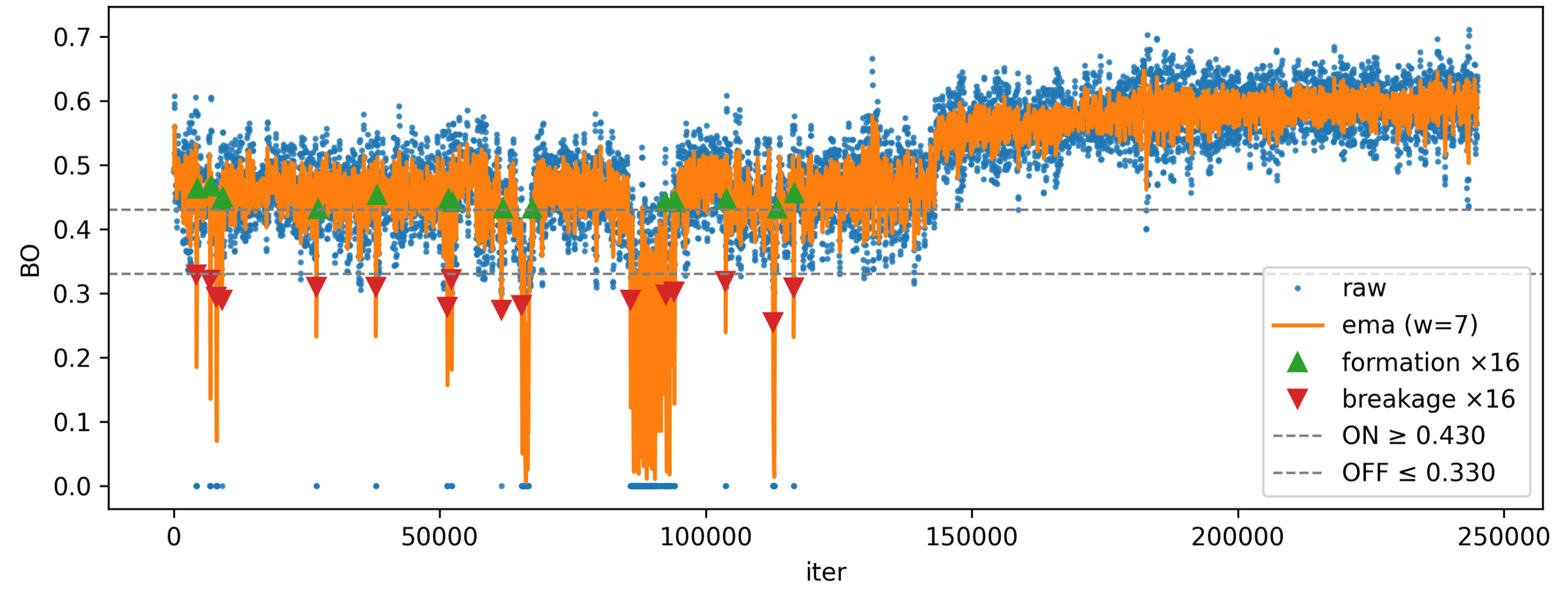
Figure: Sample bond events plot with detected bond breakage/formation iterations.
Command: coordination
Classify atoms as under-, coordinated-, or over-coordinated.
Classification compares bond-order totals against target valences from explicit maps
or inferred values.
For example, if an atom's valence is 3 and the threshold is 0.5, then:
- sum_BOs < 2.5 -> under-coordinated
- 2.5 <= sum_BOs <= 3.5 -> coordinated
- sum_BOs > 3.5 -> over-coordinated
Examples
  1. Classify using explicit valence map and export:
   reaxkit get_coordination --fort7 fort.7 --xmolout xmolout --valences Mg=2,O=2 --export coordination.csv

  2. Classify using valences inferred from force field:
   reaxkit get_coordination --fort7 fort.7 --xmolout xmolout --ffield ffield --frames 0 10 20

  3. Adjust tolerance and plot results:
   reaxkit get_coordination --fort7 fort.7 --xmolout xmolout --threshold 0.2 --plot single
Arguments
Scientific choices
| Flag |
Required |
Default |
Help |
Choices |
--frames |
No |
|
Frames selection syntax. Example: --frames 0:20:2, which selects frames 0,2,4,...,20. |
|
--every |
No |
1 |
Use every Nth selected frame. Example: --every 5, which subsamples selected frames by a factor of 5. |
|
--valences |
No |
|
Explicit valence map like Mg=2,O=2. Example: --valences Mg=2,O=2, which sets target valences directly. |
|
--threshold |
No |
0.9 |
Tolerance around target valence. Example: --threshold 0.2, which tightens classification around target BO sums. |
|
--allow-missing-valences |
No |
False |
Do not fail on missing valences. Example: --allow-missing-valences, which skips strict failure when some mappings are absent. |
|
| Flag |
Required |
Default |
Help |
Choices |
--engine |
No |
|
Engine override. Example: --engine reaxff, which forces ReaxFF file parsing rules. |
reaxff, ams, lammps |
--input |
No |
. |
Input file or directory for engine resolution. Example: --input runs/job1, which points loader context to that run. |
|
--run-dir, --dir |
No |
. |
Run directory fallback for engine detection. Example: --run-dir runs/job1, which acts as backup search location. |
|
--fort7 |
No |
fort.7 |
Path to fort.7. Example: --fort7 runs/job1/fort.7, which uses that bond-order trajectory file. |
|
--xmolout |
No |
xmolout |
Path to xmolout. Example: --xmolout runs/job1/xmolout, which supplies atom/trajectory metadata. |
|
--summary |
No |
|
Optional summary.txt path. Example: --summary runs/job1/summary.txt, which provides auxiliary timeline data when needed. |
|
--control |
No |
control |
Control file for time-axis conversion. Example: --control control, which supplies timestep settings for time conversion. |
|
--ffield |
No |
|
Optional force-field file to infer valences. Example: --ffield ffield, which derives valence targets from that force field. |
|
Outputs and plots
| Flag |
Required |
Default |
Help |
Choices |
--plot |
No |
|
Render a plot. Example: --plot single, which generates a single-panel figure. |
single, subplot |
--show |
No |
False |
Show the generated plot window. Example: --show, which opens the figure interactively. |
|
--save |
No |
|
Save the generated plot to a file path. Example: --save figures/conn.png, which writes the plot image to that path. |
|
--export |
No |
|
Write the result table to CSV. Example: --export connectivity.csv, which saves tabular results for post-processing. |
|
--grid |
No |
|
Subplot grid like 2x2 or 2*2. Example: --grid 2x2, which arranges subplot panels in a 2-by-2 layout. |
|
--xaxis |
No |
iter |
Quantity on x-axis. Example: --xaxis time, which converts iteration axis to physical time when possible. |
iter, frame, time |
--detail-format |
No |
|
Optional detail format (default: Parquet; legacy: CSV). |
parquet, csv |
Execution
| Flag |
Required |
Default |
Help |
Choices |
--execution |
No |
auto |
Execution backend; unsupported backends fall back to serial with a logged reason. |
auto, serial, threads, processes |
--workers |
No |
0 |
Frame workers: auto or N (default: auto). |
|
--chunk-size |
No |
0 |
Maximum in-flight frames: auto or N. |
|
Storage and cache
| Flag |
Required |
Default |
Help |
Choices |
--run-id |
No |
|
Run identifier for run-scoped layout. Example: --run-id run_91ac0e, which reuses that run identifier. |
|
--project-root |
No |
reaxkit_workspace |
Project root that contains inputs/, data/, analysis/, etc. Example: --project-root ./workspace, which stores run artifacts there. |
|
--analysis-id |
No |
|
Optional analysis artifact id; defaults to run id. Example: --analysis-id comparison-a, which names the analysis artifact explicitly. |
|
--input-cache, --no-input-cache |
No |
True |
Reuse parsed input frames across commands (default: enabled; use --no-input-cache to force source reads for reproducibility checks or benchmarks). Example: --no-input-cache, which reloads frames from their source files. |
|
--frame-cache-max-gb |
No |
10.0 |
Maximum workspace frame-cache size in GiB (default: 10; use 0 for unlimited). Example: --frame-cache-max-gb 20, which caps cached frames at 20 GiB. |
|
--output-profile |
No |
standard |
Select the shared artifact policy. Standard writes declared default outputs; minimal keeps core tables; full and legacy include optional details. Default: standard. Example: --output-profile full, which includes declared optional detail tables. |
minimal, standard, full, legacy |
Diagnostics and compatibility
| Flag |
Required |
Default |
Help |
Choices |
-h, --help |
No |
|
show this help message and exit |
|
--help-all, --all-flags |
No |
|
Show every option, grouped by purpose. |
|
--log |
No |
|
Logging level. Example: --log verbose, which prints more processing details. |
verbose, quiet |
Command: get_coordination
Classify atoms as under-, coordinated-, or over-coordinated.
Classification compares bond-order totals against target valences from explicit maps
or inferred values.
For example, if an atom's valence is 3 and the threshold is 0.5, then:
- sum_BOs < 2.5 -> under-coordinated
- 2.5 <= sum_BOs <= 3.5 -> coordinated
- sum_BOs > 3.5 -> over-coordinated
Examples
  1. Classify using explicit valence map and export:
   reaxkit get_coordination --fort7 fort.7 --xmolout xmolout --valences Mg=2,O=2 --export coordination.csv

  2. Classify using valences inferred from force field:
   reaxkit get_coordination --fort7 fort.7 --xmolout xmolout --ffield ffield --frames 0 10 20

  3. Adjust tolerance and plot results:
   reaxkit get_coordination --fort7 fort.7 --xmolout xmolout --threshold 0.2 --plot single
Arguments
Scientific choices
| Flag |
Required |
Default |
Help |
Choices |
--frames |
No |
|
Frames selection syntax. Example: --frames 0:20:2, which selects frames 0,2,4,...,20. |
|
--every |
No |
1 |
Use every Nth selected frame. Example: --every 5, which subsamples selected frames by a factor of 5. |
|
--valences |
No |
|
Explicit valence map like Mg=2,O=2. Example: --valences Mg=2,O=2, which sets target valences directly. |
|
--threshold |
No |
0.9 |
Tolerance around target valence. Example: --threshold 0.2, which tightens classification around target BO sums. |
|
--allow-missing-valences |
No |
False |
Do not fail on missing valences. Example: --allow-missing-valences, which skips strict failure when some mappings are absent. |
|
| Flag |
Required |
Default |
Help |
Choices |
--engine |
No |
|
Engine override. Example: --engine reaxff, which forces ReaxFF file parsing rules. |
reaxff, ams, lammps |
--input |
No |
. |
Input file or directory for engine resolution. Example: --input runs/job1, which points loader context to that run. |
|
--run-dir, --dir |
No |
. |
Run directory fallback for engine detection. Example: --run-dir runs/job1, which acts as backup search location. |
|
--fort7 |
No |
fort.7 |
Path to fort.7. Example: --fort7 runs/job1/fort.7, which uses that bond-order trajectory file. |
|
--xmolout |
No |
xmolout |
Path to xmolout. Example: --xmolout runs/job1/xmolout, which supplies atom/trajectory metadata. |
|
--summary |
No |
|
Optional summary.txt path. Example: --summary runs/job1/summary.txt, which provides auxiliary timeline data when needed. |
|
--control |
No |
control |
Control file for time-axis conversion. Example: --control control, which supplies timestep settings for time conversion. |
|
--ffield |
No |
|
Optional force-field file to infer valences. Example: --ffield ffield, which derives valence targets from that force field. |
|
Outputs and plots
| Flag |
Required |
Default |
Help |
Choices |
--plot |
No |
|
Render a plot. Example: --plot single, which generates a single-panel figure. |
single, subplot |
--show |
No |
False |
Show the generated plot window. Example: --show, which opens the figure interactively. |
|
--save |
No |
|
Save the generated plot to a file path. Example: --save figures/conn.png, which writes the plot image to that path. |
|
--export |
No |
|
Write the result table to CSV. Example: --export connectivity.csv, which saves tabular results for post-processing. |
|
--grid |
No |
|
Subplot grid like 2x2 or 2*2. Example: --grid 2x2, which arranges subplot panels in a 2-by-2 layout. |
|
--xaxis |
No |
iter |
Quantity on x-axis. Example: --xaxis time, which converts iteration axis to physical time when possible. |
iter, frame, time |
--detail-format |
No |
|
Optional detail format (default: Parquet; legacy: CSV). |
parquet, csv |
Execution
| Flag |
Required |
Default |
Help |
Choices |
--execution |
No |
auto |
Execution backend; unsupported backends fall back to serial with a logged reason. |
auto, serial, threads, processes |
--workers |
No |
0 |
Frame workers: auto or N (default: auto). |
|
--chunk-size |
No |
0 |
Maximum in-flight frames: auto or N. |
|
Storage and cache
| Flag |
Required |
Default |
Help |
Choices |
--run-id |
No |
|
Run identifier for run-scoped layout. Example: --run-id run_91ac0e, which reuses that run identifier. |
|
--project-root |
No |
reaxkit_workspace |
Project root that contains inputs/, data/, analysis/, etc. Example: --project-root ./workspace, which stores run artifacts there. |
|
--analysis-id |
No |
|
Optional analysis artifact id; defaults to run id. Example: --analysis-id comparison-a, which names the analysis artifact explicitly. |
|
--input-cache, --no-input-cache |
No |
True |
Reuse parsed input frames across commands (default: enabled; use --no-input-cache to force source reads for reproducibility checks or benchmarks). Example: --no-input-cache, which reloads frames from their source files. |
|
--frame-cache-max-gb |
No |
10.0 |
Maximum workspace frame-cache size in GiB (default: 10; use 0 for unlimited). Example: --frame-cache-max-gb 20, which caps cached frames at 20 GiB. |
|
--output-profile |
No |
standard |
Select the shared artifact policy. Standard writes declared default outputs; minimal keeps core tables; full and legacy include optional details. Default: standard. Example: --output-profile full, which includes declared optional detail tables. |
minimal, standard, full, legacy |
Diagnostics and compatibility
| Flag |
Required |
Default |
Help |
Choices |
-h, --help |
No |
|
show this help message and exit |
|
--help-all, --all-flags |
No |
|
Show every option, grouped by purpose. |
|
--log |
No |
|
Logging level. Example: --log verbose, which prints more processing details. |
verbose, quiet |
Command: coordination_relabel
Relabel trajectory atom labels based on coordination status.
This command computes coordination classes and writes a relabeled trajectory using
engine-specific output formatting.
Examples
  1. Relabel using defaults and write output trajectory:
   reaxkit relabel_traj_using_coordination --fort7 fort.7 --xmolout xmolout --output xmolout_relabeled

  2. Use explicit valences and type-aware relabeling:
   reaxkit relabel_traj_using_coordination --valences Mg=2,O=2 --mode by_type --keep-coord-original --output relabeled.xyz

  3. Use inferred valences, custom status labels, and export status table:
   reaxkit relabel_traj_using_coordination --ffield ffield --frames 0 10 20 --labels=-1=U,0=C,1=O --export coordination.csv --output relabeled.xmolout
Arguments
Scientific choices
| Flag |
Required |
Default |
Help |
Choices |
--frames |
No |
|
Frames selection syntax. Example: --frames 0:20:2, which selects frames 0,2,4,...,20. |
|
--every |
No |
1 |
Use every Nth selected frame. Example: --every 5, which subsamples selected frames by a factor of 5. |
|
--valences |
No |
|
Explicit valence map like Mg=2,O=2. Example: --valences Mg=2,O=2, which sets coordination targets directly. |
|
--threshold |
No |
0.9 |
Tolerance around target valence. Example: --threshold 0.2, which makes status classification stricter. |
|
--allow-missing-valences |
No |
False |
Do not fail on missing valences. Example: --allow-missing-valences, which permits partial valence definitions. |
|
--mode |
No |
global |
Relabeling mode. Example: --mode by_type, which applies status labels per atom type context. |
global, by_type |
--keep-coord-original |
No |
False |
Keep original label when status is coordinated in by_type mode. Example: --keep-coord-original, which preserves original labels for coordinated atoms. |
|
| Flag |
Required |
Default |
Help |
Choices |
--engine |
No |
|
Engine override. Example: --engine reaxff, which forces ReaxFF file parsing rules. |
reaxff, ams, lammps |
--input |
No |
. |
Input file or directory for engine resolution. Example: --input runs/job1, which points loader context to that run. |
|
--run-dir, --dir |
No |
. |
Run directory fallback for engine detection. Example: --run-dir runs/job1, which acts as backup search location. |
|
--fort7 |
No |
fort.7 |
Path to fort.7. Example: --fort7 runs/job1/fort.7, which uses that bond-order trajectory file. |
|
--xmolout |
No |
xmolout |
Path to xmolout. Example: --xmolout runs/job1/xmolout, which supplies atom/trajectory metadata. |
|
--summary |
No |
|
Optional summary.txt path. Example: --summary runs/job1/summary.txt, which provides auxiliary timeline data when needed. |
|
--control |
No |
control |
Control file for time-axis conversion. Example: --control control, which supplies timestep settings for time conversion. |
|
--ffield |
No |
|
Optional force-field file to infer valences. Example: --ffield ffield, which derives target valences automatically. |
|
--simulation |
No |
|
Optional trajectory writer simulation label. Example: --simulation run_01, which tags output with that simulation name when supported. |
|
Outputs and plots
| Flag |
Required |
Default |
Help |
Choices |
--plot |
No |
|
Render a plot. Example: --plot single, which generates a single-panel figure. |
single, subplot |
--show |
No |
False |
Show the generated plot window. Example: --show, which opens the figure interactively. |
|
--save |
No |
|
Save the generated plot to a file path. Example: --save figures/conn.png, which writes the plot image to that path. |
|
--export |
No |
|
Write the result table to CSV. Example: --export connectivity.csv, which saves tabular results for post-processing. |
|
--grid |
No |
|
Subplot grid like 2x2 or 2*2. Example: --grid 2x2, which arranges subplot panels in a 2-by-2 layout. |
|
--xaxis |
No |
iter |
Quantity on x-axis. Example: --xaxis time, which converts iteration axis to physical time when possible. |
iter, frame, time |
--output |
Yes |
|
Output trajectory path. Example: --output relabeled.xmolout, which writes relabeled trajectory to that file. |
|
--labels |
No |
|
Status tag map like -1=U,0=C,1=O. Example: --labels=-1=U,0=C,1=O, which customizes output status tokens. |
|
--precision |
No |
6 |
Writer precision when supported by the engine. Example: --precision 8, which writes numeric coordinates with higher decimal precision. |
|
--detail-format |
No |
|
Optional detail format (default: Parquet; legacy: CSV). |
parquet, csv |
Execution
| Flag |
Required |
Default |
Help |
Choices |
--execution |
No |
auto |
Execution backend; unsupported backends fall back to serial with a logged reason. |
auto, serial, threads, processes |
--workers |
No |
0 |
Frame workers: auto or N (default: auto). |
|
--chunk-size |
No |
0 |
Maximum in-flight frames: auto or N. |
|
Storage and cache
| Flag |
Required |
Default |
Help |
Choices |
--run-id |
No |
|
Run identifier for run-scoped layout. Example: --run-id run_91ac0e, which reuses that run identifier. |
|
--project-root |
No |
reaxkit_workspace |
Project root that contains inputs/, data/, analysis/, etc. Example: --project-root ./workspace, which stores run artifacts there. |
|
--analysis-id |
No |
|
Optional analysis artifact id; defaults to run id. Example: --analysis-id comparison-a, which names the analysis artifact explicitly. |
|
--input-cache, --no-input-cache |
No |
True |
Reuse parsed input frames across commands (default: enabled; use --no-input-cache to force source reads for reproducibility checks or benchmarks). Example: --no-input-cache, which reloads frames from their source files. |
|
--frame-cache-max-gb |
No |
10.0 |
Maximum workspace frame-cache size in GiB (default: 10; use 0 for unlimited). Example: --frame-cache-max-gb 20, which caps cached frames at 20 GiB. |
|
--output-profile |
No |
standard |
Select the shared artifact policy. Standard writes declared default outputs; minimal keeps core tables; full and legacy include optional details. Default: standard. Example: --output-profile full, which includes declared optional detail tables. |
minimal, standard, full, legacy |
Diagnostics and compatibility
| Flag |
Required |
Default |
Help |
Choices |
-h, --help |
No |
|
show this help message and exit |
|
--help-all, --all-flags |
No |
|
Show every option, grouped by purpose. |
|
--log |
No |
|
Logging level. Example: --log verbose, which prints more processing details. |
verbose, quiet |
Command: relabel_traj_using_coordination
Relabel trajectory atom labels based on coordination status.
This command computes coordination classes and writes a relabeled trajectory using
engine-specific output formatting.
Examples
  1. Relabel using defaults and write output trajectory:
   reaxkit relabel_traj_using_coordination --fort7 fort.7 --xmolout xmolout --output xmolout_relabeled

  2. Use explicit valences and type-aware relabeling:
   reaxkit relabel_traj_using_coordination --valences Mg=2,O=2 --mode by_type --keep-coord-original --output relabeled.xyz

  3. Use inferred valences, custom status labels, and export status table:
   reaxkit relabel_traj_using_coordination --ffield ffield --frames 0 10 20 --labels=-1=U,0=C,1=O --export coordination.csv --output relabeled.xmolout
Arguments
Scientific choices
| Flag |
Required |
Default |
Help |
Choices |
--frames |
No |
|
Frames selection syntax. Example: --frames 0:20:2, which selects frames 0,2,4,...,20. |
|
--every |
No |
1 |
Use every Nth selected frame. Example: --every 5, which subsamples selected frames by a factor of 5. |
|
--valences |
No |
|
Explicit valence map like Mg=2,O=2. Example: --valences Mg=2,O=2, which sets coordination targets directly. |
|
--threshold |
No |
0.9 |
Tolerance around target valence. Example: --threshold 0.2, which makes status classification stricter. |
|
--allow-missing-valences |
No |
False |
Do not fail on missing valences. Example: --allow-missing-valences, which permits partial valence definitions. |
|
--mode |
No |
global |
Relabeling mode. Example: --mode by_type, which applies status labels per atom type context. |
global, by_type |
--keep-coord-original |
No |
False |
Keep original label when status is coordinated in by_type mode. Example: --keep-coord-original, which preserves original labels for coordinated atoms. |
|
| Flag |
Required |
Default |
Help |
Choices |
--engine |
No |
|
Engine override. Example: --engine reaxff, which forces ReaxFF file parsing rules. |
reaxff, ams, lammps |
--input |
No |
. |
Input file or directory for engine resolution. Example: --input runs/job1, which points loader context to that run. |
|
--run-dir, --dir |
No |
. |
Run directory fallback for engine detection. Example: --run-dir runs/job1, which acts as backup search location. |
|
--fort7 |
No |
fort.7 |
Path to fort.7. Example: --fort7 runs/job1/fort.7, which uses that bond-order trajectory file. |
|
--xmolout |
No |
xmolout |
Path to xmolout. Example: --xmolout runs/job1/xmolout, which supplies atom/trajectory metadata. |
|
--summary |
No |
|
Optional summary.txt path. Example: --summary runs/job1/summary.txt, which provides auxiliary timeline data when needed. |
|
--control |
No |
control |
Control file for time-axis conversion. Example: --control control, which supplies timestep settings for time conversion. |
|
--ffield |
No |
|
Optional force-field file to infer valences. Example: --ffield ffield, which derives target valences automatically. |
|
--simulation |
No |
|
Optional trajectory writer simulation label. Example: --simulation run_01, which tags output with that simulation name when supported. |
|
Outputs and plots
| Flag |
Required |
Default |
Help |
Choices |
--plot |
No |
|
Render a plot. Example: --plot single, which generates a single-panel figure. |
single, subplot |
--show |
No |
False |
Show the generated plot window. Example: --show, which opens the figure interactively. |
|
--save |
No |
|
Save the generated plot to a file path. Example: --save figures/conn.png, which writes the plot image to that path. |
|
--export |
No |
|
Write the result table to CSV. Example: --export connectivity.csv, which saves tabular results for post-processing. |
|
--grid |
No |
|
Subplot grid like 2x2 or 2*2. Example: --grid 2x2, which arranges subplot panels in a 2-by-2 layout. |
|
--xaxis |
No |
iter |
Quantity on x-axis. Example: --xaxis time, which converts iteration axis to physical time when possible. |
iter, frame, time |
--output |
Yes |
|
Output trajectory path. Example: --output relabeled.xmolout, which writes relabeled trajectory to that file. |
|
--labels |
No |
|
Status tag map like -1=U,0=C,1=O. Example: --labels=-1=U,0=C,1=O, which customizes output status tokens. |
|
--precision |
No |
6 |
Writer precision when supported by the engine. Example: --precision 8, which writes numeric coordinates with higher decimal precision. |
|
--detail-format |
No |
|
Optional detail format (default: Parquet; legacy: CSV). |
parquet, csv |
Execution
| Flag |
Required |
Default |
Help |
Choices |
--execution |
No |
auto |
Execution backend; unsupported backends fall back to serial with a logged reason. |
auto, serial, threads, processes |
--workers |
No |
0 |
Frame workers: auto or N (default: auto). |
|
--chunk-size |
No |
0 |
Maximum in-flight frames: auto or N. |
|
Storage and cache
| Flag |
Required |
Default |
Help |
Choices |
--run-id |
No |
|
Run identifier for run-scoped layout. Example: --run-id run_91ac0e, which reuses that run identifier. |
|
--project-root |
No |
reaxkit_workspace |
Project root that contains inputs/, data/, analysis/, etc. Example: --project-root ./workspace, which stores run artifacts there. |
|
--analysis-id |
No |
|
Optional analysis artifact id; defaults to run id. Example: --analysis-id comparison-a, which names the analysis artifact explicitly. |
|
--input-cache, --no-input-cache |
No |
True |
Reuse parsed input frames across commands (default: enabled; use --no-input-cache to force source reads for reproducibility checks or benchmarks). Example: --no-input-cache, which reloads frames from their source files. |
|
--frame-cache-max-gb |
No |
10.0 |
Maximum workspace frame-cache size in GiB (default: 10; use 0 for unlimited). Example: --frame-cache-max-gb 20, which caps cached frames at 20 GiB. |
|
--output-profile |
No |
standard |
Select the shared artifact policy. Standard writes declared default outputs; minimal keeps core tables; full and legacy include optional details. Default: standard. Example: --output-profile full, which includes declared optional detail tables. |
minimal, standard, full, legacy |
Diagnostics and compatibility
| Flag |
Required |
Default |
Help |
Choices |
-h, --help |
No |
|
show this help message and exit |
|
--help-all, --all-flags |
No |
|
Show every option, grouped by purpose. |
|
--log |
No |
|
Logging level. Example: --log verbose, which prints more processing details. |
verbose, quiet |
The figure below shows an example relabeling output where atoms labels are changed according to their coordination status, and then plotted using OVITO.
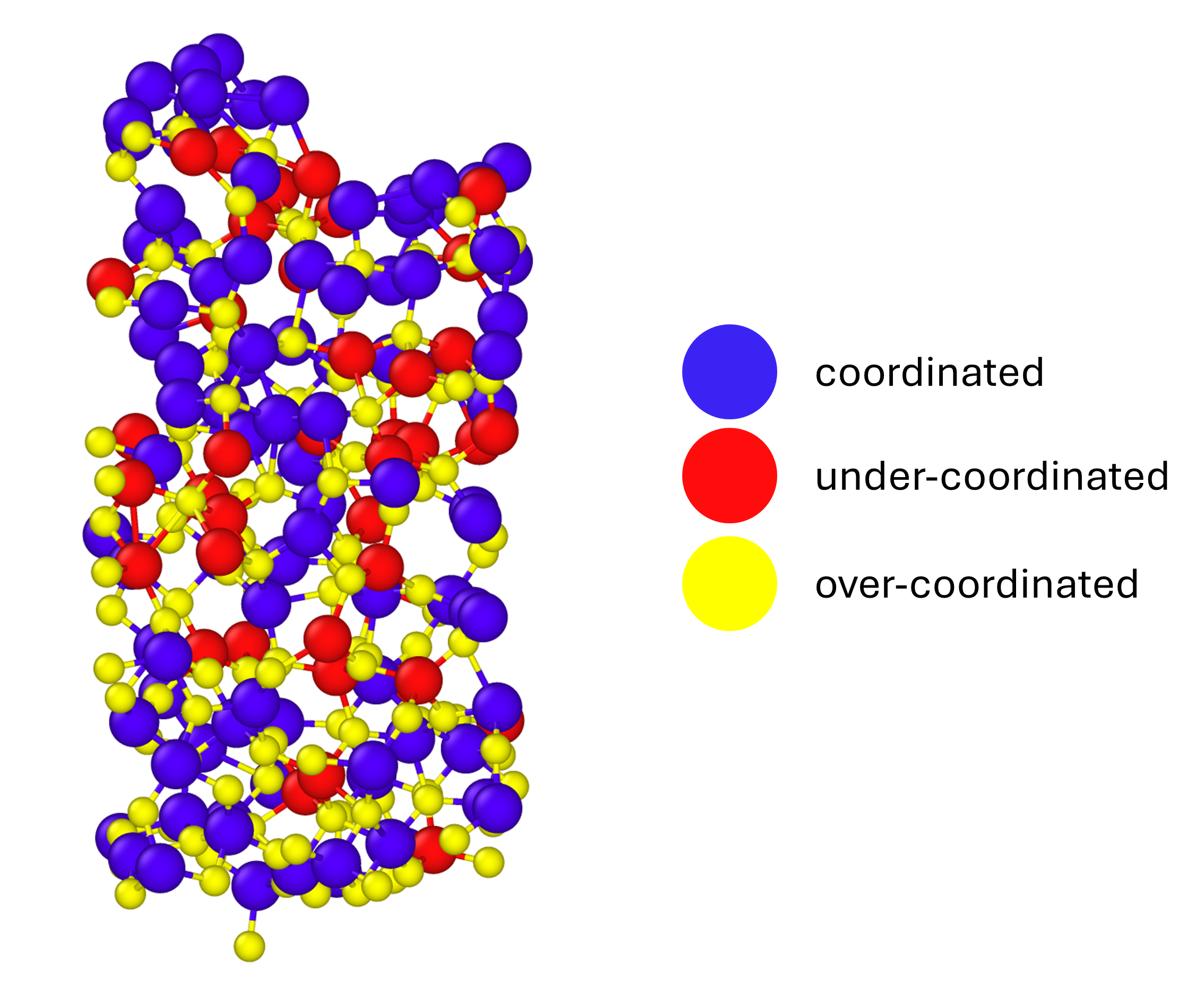
Figure: Sample relabeling output plot based on their coordination status.
Command: hybridization
Classify atoms against target hybridization bond-order sums.
You can define global hybridization targets or per-element target maps, then restrict
classification to specific elements or atom ids.
Examples
  1. Use global hybridization targets and export:
   reaxkit get_hybridization --fort7 fort.7 --xmolout xmolout --hybridizations sp=1,sp2=2,sp3=3 --export hyb.csv

  2. Use element-specific hybridization targets:
   reaxkit get_hybridization --fort7 fort.7 --xmolout xmolout --element-hybridizations "C:sp=1,sp2=2,sp3=3;N:sp2=2,sp3=3"

  3. Restrict to selected elements and tighten tolerance:
   reaxkit get_hybridization --fort7 fort.7 --xmolout xmolout --target-elements C O --threshold 0.2
Arguments
Scientific choices
| Flag |
Required |
Default |
Help |
Choices |
--frames |
No |
|
Frames selection syntax. Example: --frames 0:20:2, which selects frames 0,2,4,...,20. |
|
--every |
No |
1 |
Use every Nth selected frame. Example: --every 5, which subsamples selected frames by a factor of 5. |
|
--hybridizations |
No |
|
Global map like sp=1,sp2=2,sp3=3. Example: --hybridizations sp=1,sp2=2,sp3=3, which applies one map to all elements. |
|
--element-hybridizations |
No |
|
Per-element map like C:sp=1,sp2=2;N:sp2=2,sp3=3. Example: --element-hybridizations "C:sp=1,sp2=2,sp3=3", which customizes targets for specific elements. |
|
--target-elements |
No |
|
Restrict to selected elements. Example: --target-elements C O, which evaluates only carbon and oxygen atoms. |
|
--target-atom-ids |
No |
|
Restrict to selected atom ids. Example: --target-atom-ids 1 2 5, which evaluates only those atom indices. |
|
--threshold |
No |
0.3 |
Tolerance around target BO sum. Example: --threshold 0.2, which tightens hybridization matching tolerance. |
|
--allow-undefined-hybridization |
No |
False |
Do not fail on missing mappings. Example: --allow-undefined-hybridization, which allows output even when some atoms have no configured target. |
|
| Flag |
Required |
Default |
Help |
Choices |
--engine |
No |
|
Engine override. Example: --engine reaxff, which forces ReaxFF file parsing rules. |
reaxff, ams, lammps |
--input |
No |
. |
Input file or directory for engine resolution. Example: --input runs/job1, which points loader context to that run. |
|
--run-dir, --dir |
No |
. |
Run directory fallback for engine detection. Example: --run-dir runs/job1, which acts as backup search location. |
|
--fort7 |
No |
fort.7 |
Path to fort.7. Example: --fort7 runs/job1/fort.7, which uses that bond-order trajectory file. |
|
--xmolout |
No |
xmolout |
Path to xmolout. Example: --xmolout runs/job1/xmolout, which supplies atom/trajectory metadata. |
|
--summary |
No |
|
Optional summary.txt path. Example: --summary runs/job1/summary.txt, which provides auxiliary timeline data when needed. |
|
--control |
No |
control |
Control file for time-axis conversion. Example: --control control, which supplies timestep settings for time conversion. |
|
Outputs and plots
| Flag |
Required |
Default |
Help |
Choices |
--plot |
No |
|
Render a plot. Example: --plot single, which generates a single-panel figure. |
single, subplot |
--show |
No |
False |
Show the generated plot window. Example: --show, which opens the figure interactively. |
|
--save |
No |
|
Save the generated plot to a file path. Example: --save figures/conn.png, which writes the plot image to that path. |
|
--export |
No |
|
Write the result table to CSV. Example: --export connectivity.csv, which saves tabular results for post-processing. |
|
--grid |
No |
|
Subplot grid like 2x2 or 2*2. Example: --grid 2x2, which arranges subplot panels in a 2-by-2 layout. |
|
--xaxis |
No |
iter |
Quantity on x-axis. Example: --xaxis time, which converts iteration axis to physical time when possible. |
iter, frame, time |
--detail-format |
No |
|
Optional detail format (default: Parquet; legacy: CSV). |
parquet, csv |
Execution
| Flag |
Required |
Default |
Help |
Choices |
--execution |
No |
auto |
Execution backend; unsupported backends fall back to serial with a logged reason. |
auto, serial, threads, processes |
--workers |
No |
0 |
Frame workers: auto or N (default: auto). |
|
--chunk-size |
No |
0 |
Maximum in-flight frames: auto or N. |
|
Storage and cache
| Flag |
Required |
Default |
Help |
Choices |
--run-id |
No |
|
Run identifier for run-scoped layout. Example: --run-id run_91ac0e, which reuses that run identifier. |
|
--project-root |
No |
reaxkit_workspace |
Project root that contains inputs/, data/, analysis/, etc. Example: --project-root ./workspace, which stores run artifacts there. |
|
--analysis-id |
No |
|
Optional analysis artifact id; defaults to run id. Example: --analysis-id comparison-a, which names the analysis artifact explicitly. |
|
--input-cache, --no-input-cache |
No |
True |
Reuse parsed input frames across commands (default: enabled; use --no-input-cache to force source reads for reproducibility checks or benchmarks). Example: --no-input-cache, which reloads frames from their source files. |
|
--frame-cache-max-gb |
No |
10.0 |
Maximum workspace frame-cache size in GiB (default: 10; use 0 for unlimited). Example: --frame-cache-max-gb 20, which caps cached frames at 20 GiB. |
|
--output-profile |
No |
standard |
Select the shared artifact policy. Standard writes declared default outputs; minimal keeps core tables; full and legacy include optional details. Default: standard. Example: --output-profile full, which includes declared optional detail tables. |
minimal, standard, full, legacy |
Diagnostics and compatibility
| Flag |
Required |
Default |
Help |
Choices |
-h, --help |
No |
|
show this help message and exit |
|
--help-all, --all-flags |
No |
|
Show every option, grouped by purpose. |
|
--log |
No |
|
Logging level. Example: --log verbose, which prints more processing details. |
verbose, quiet |
Command: get_hybridization
Classify atoms against target hybridization bond-order sums.
You can define global hybridization targets or per-element target maps, then restrict
classification to specific elements or atom ids.
Examples
  1. Use global hybridization targets and export:
   reaxkit get_hybridization --fort7 fort.7 --xmolout xmolout --hybridizations sp=1,sp2=2,sp3=3 --export hyb.csv

  2. Use element-specific hybridization targets:
   reaxkit get_hybridization --fort7 fort.7 --xmolout xmolout --element-hybridizations "C:sp=1,sp2=2,sp3=3;N:sp2=2,sp3=3"

  3. Restrict to selected elements and tighten tolerance:
   reaxkit get_hybridization --fort7 fort.7 --xmolout xmolout --target-elements C O --threshold 0.2
Arguments
Scientific choices
| Flag |
Required |
Default |
Help |
Choices |
--frames |
No |
|
Frames selection syntax. Example: --frames 0:20:2, which selects frames 0,2,4,...,20. |
|
--every |
No |
1 |
Use every Nth selected frame. Example: --every 5, which subsamples selected frames by a factor of 5. |
|
--hybridizations |
No |
|
Global map like sp=1,sp2=2,sp3=3. Example: --hybridizations sp=1,sp2=2,sp3=3, which applies one map to all elements. |
|
--element-hybridizations |
No |
|
Per-element map like C:sp=1,sp2=2;N:sp2=2,sp3=3. Example: --element-hybridizations "C:sp=1,sp2=2,sp3=3", which customizes targets for specific elements. |
|
--target-elements |
No |
|
Restrict to selected elements. Example: --target-elements C O, which evaluates only carbon and oxygen atoms. |
|
--target-atom-ids |
No |
|
Restrict to selected atom ids. Example: --target-atom-ids 1 2 5, which evaluates only those atom indices. |
|
--threshold |
No |
0.3 |
Tolerance around target BO sum. Example: --threshold 0.2, which tightens hybridization matching tolerance. |
|
--allow-undefined-hybridization |
No |
False |
Do not fail on missing mappings. Example: --allow-undefined-hybridization, which allows output even when some atoms have no configured target. |
|
| Flag |
Required |
Default |
Help |
Choices |
--engine |
No |
|
Engine override. Example: --engine reaxff, which forces ReaxFF file parsing rules. |
reaxff, ams, lammps |
--input |
No |
. |
Input file or directory for engine resolution. Example: --input runs/job1, which points loader context to that run. |
|
--run-dir, --dir |
No |
. |
Run directory fallback for engine detection. Example: --run-dir runs/job1, which acts as backup search location. |
|
--fort7 |
No |
fort.7 |
Path to fort.7. Example: --fort7 runs/job1/fort.7, which uses that bond-order trajectory file. |
|
--xmolout |
No |
xmolout |
Path to xmolout. Example: --xmolout runs/job1/xmolout, which supplies atom/trajectory metadata. |
|
--summary |
No |
|
Optional summary.txt path. Example: --summary runs/job1/summary.txt, which provides auxiliary timeline data when needed. |
|
--control |
No |
control |
Control file for time-axis conversion. Example: --control control, which supplies timestep settings for time conversion. |
|
Outputs and plots
| Flag |
Required |
Default |
Help |
Choices |
--plot |
No |
|
Render a plot. Example: --plot single, which generates a single-panel figure. |
single, subplot |
--show |
No |
False |
Show the generated plot window. Example: --show, which opens the figure interactively. |
|
--save |
No |
|
Save the generated plot to a file path. Example: --save figures/conn.png, which writes the plot image to that path. |
|
--export |
No |
|
Write the result table to CSV. Example: --export connectivity.csv, which saves tabular results for post-processing. |
|
--grid |
No |
|
Subplot grid like 2x2 or 2*2. Example: --grid 2x2, which arranges subplot panels in a 2-by-2 layout. |
|
--xaxis |
No |
iter |
Quantity on x-axis. Example: --xaxis time, which converts iteration axis to physical time when possible. |
iter, frame, time |
--detail-format |
No |
|
Optional detail format (default: Parquet; legacy: CSV). |
parquet, csv |
Execution
| Flag |
Required |
Default |
Help |
Choices |
--execution |
No |
auto |
Execution backend; unsupported backends fall back to serial with a logged reason. |
auto, serial, threads, processes |
--workers |
No |
0 |
Frame workers: auto or N (default: auto). |
|
--chunk-size |
No |
0 |
Maximum in-flight frames: auto or N. |
|
Storage and cache
| Flag |
Required |
Default |
Help |
Choices |
--run-id |
No |
|
Run identifier for run-scoped layout. Example: --run-id run_91ac0e, which reuses that run identifier. |
|
--project-root |
No |
reaxkit_workspace |
Project root that contains inputs/, data/, analysis/, etc. Example: --project-root ./workspace, which stores run artifacts there. |
|
--analysis-id |
No |
|
Optional analysis artifact id; defaults to run id. Example: --analysis-id comparison-a, which names the analysis artifact explicitly. |
|
--input-cache, --no-input-cache |
No |
True |
Reuse parsed input frames across commands (default: enabled; use --no-input-cache to force source reads for reproducibility checks or benchmarks). Example: --no-input-cache, which reloads frames from their source files. |
|
--frame-cache-max-gb |
No |
10.0 |
Maximum workspace frame-cache size in GiB (default: 10; use 0 for unlimited). Example: --frame-cache-max-gb 20, which caps cached frames at 20 GiB. |
|
--output-profile |
No |
standard |
Select the shared artifact policy. Standard writes declared default outputs; minimal keeps core tables; full and legacy include optional details. Default: standard. Example: --output-profile full, which includes declared optional detail tables. |
minimal, standard, full, legacy |
Diagnostics and compatibility
| Flag |
Required |
Default |
Help |
Choices |
-h, --help |
No |
|
show this help message and exit |
|
--help-all, --all-flags |
No |
|
Show every option, grouped by purpose. |
|
--log |
No |
|
Logging level. Example: --log verbose, which prints more processing details. |
verbose, quiet |
Common Runtime and Presentation Arguments
These are shared workflow-level CLI flags added before command-specific options, covering runtime context (engine/input/storage) and output presentation/export behavior.
Each command table above includes its shared and inherited options.