Introspection Workflow
CLI workflow for introspecting ReaxKit modules and folders.
This workflow powers the reaxkit intspec command, allowing users to:
- Inspect a single Python module and view its top-level docstring summary
along with public functions/classes and their one-line descriptions.
- Recursively scan a folder or package and list all contained .py files
with their module docstring first lines.
It is designed as a lightweight discovery and navigation tool to help users understand what functionality exists inside ReaxKit without opening files manually.
Usage context
- Command routing: Resolve CLI aliases and normalized command names.
- Task execution: Build request objects and invoke registered tasks.
- Output handling: Forward results to table, plot, export, or report flows.
Command: intspec
Inspect ReaxKit modules and folders for quick codebase discovery.
This command supports two mutually exclusive modes:
1. --file -> inspect one module/file and list public symbols
2. --folder -> recursively list modules with docstring summaries
Use it to understand available functionality without opening files manually.
Examples
  1. Recursively inspect the workflows package via shorthand:
   reaxkit intspec --folder workflows

  2. Inspect a specific dotted package path:
   reaxkit intspec --folder reaxkit.workflows.meta

  3. Inspect a module by dotted module name:
   reaxkit intspec --file reaxkit.workflows.meta.help_workflow
Arguments
Input and file selection
| Flag | Required | Default | Help | Choices |
|---|---|---|---|---|
--file |
No | Module name or path to .py. Example: --file reaxkit.workflows.meta.help_workflow, which inspects that module and lists public symbols. | ||
--folder |
No | Folder/package to scan recursively. Example: --folder workflows, which expands to the workflows package and lists contained modules. |
Outputs and plots
| Flag | Required | Default | Help | Choices |
|---|---|---|---|---|
--detail-format |
No | Optional detail format (default: Parquet; legacy: CSV). | parquet, csv |
Execution
| Flag | Required | Default | Help | Choices |
|---|---|---|---|---|
--execution |
No | auto | Execution backend; unsupported backends fall back to serial with a logged reason. | auto, serial, threads, processes |
--workers |
No | 0 | Frame workers: auto or N (default: auto). | |
--chunk-size |
No | 0 | Maximum in-flight frames: auto or N. |
Storage and cache
| Flag | Required | Default | Help | Choices |
|---|---|---|---|---|
--output-profile |
No | standard | Artifact profile (default: standard). | standard, minimal, full, legacy |
Diagnostics and compatibility
| Flag | Required | Default | Help | Choices |
|---|---|---|---|---|
-h, --help |
No | show this help message and exit | ||
--help-all, --all-flags |
No | Show every option, grouped by purpose. |
The figure below shows an example terminal output when running intspec on workflows.
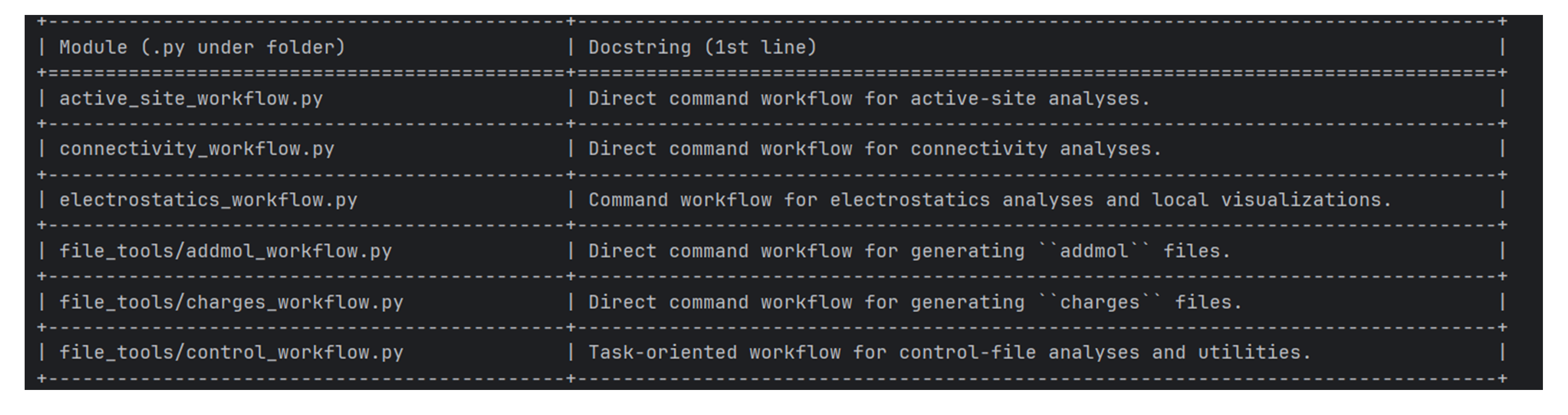
Figure: Sample terminal output when running intspec on workflows.
Common Runtime and Presentation Arguments
These are shared workflow-level CLI flags added before command-specific options, covering runtime context (engine/input/storage) and output presentation/export behavior.
Each command table above includes its shared and inherited options.